[알아봅시다] 다시보는 정보통신망법

개인정보제공 동의 안해도
회원가입 'OK'

법개정… 이용자 선택폭 넓혀
기존가입자도 동의 철회 가능


최근 넥슨 `메이플스토리`의 회원정보 1320만건 유출 사건 이후 또 다시 과도한 개인정보수집으로 인한 문제점이 지적되고 있습니다. 포털을 비롯해, 게임, 쇼핑몰 등 대부분의 인터넷 사이트들이 회원 가입시 상당한 양의 개인정보 수집 동의를 요구하는데요. 수집에 동의하지 않으면 회원 가입이 안되다 보니, 그동안 소비자들은 `울며 겨자 먹기 식`으로 자신들의 정보를 내어줄 수밖에 없었습니다. 이러한 기업들의 과도한 개인정보 수집은 해커들의 좋은 먹잇감이 되기 십상이었습니다. 또 이들 정보를 기업들이 악용해 제3자에게 제공하거나 취급 위탁을 맡기는 등 관리에 소홀하다는 지적이 연이어 나오면서, 결국 정부는 개인정보 수집과 관련해 법령을 개정했습니다.

지난 4월`정보통신망 이용촉진 및 정보보호 등에 관련 법률(이하 정보통신망법)`이 개정돼 7월부터 시행되고 있습니다.

우선 정보통신망법은 정보통신서비스제공자가 개인정보 수집ㆍ이용ㆍ제공 및 개인정보 취급위탁에 대해 이용자로부터 동의를 받도록 규정하고 있습니다.

개인정보 수집 시 △개인정보의 수집ㆍ이용ㆍ목적 △수집하는 개인정보 항목 △개인정보 보유ㆍ이용 기간 등 3개 항목을 제시하고 동의를 획득해야 합니다. 또 개인정보 위탁시에는 △수탁자 △수탁업무의 내용 등 2개 항목을 동의 받거나 고지 혹은 공지해야합니다. 개인정보를 제3자에게 제공할 때도 △제공받는 자 △제공ㆍ이용 목적 △제공 항목 △보유 및 이용기간 등 3개 항목을 제시하고 동의를 획득해야합니다.

그런데 많은 기업들이 △개인정보 수집ㆍ이용 동의 △제3자 제공 동의 △취급위탁 동의 등 3가지 동의 사항을 한꺼번에 제시하거나 3가지 사항 중 하나라도 동의하지 않으면 서비스 가입을 제한하는 등 이용자 선택권을 제한했습니다.

이를 개선하기 위해 지난 4월 정통망법이 개정돼 시행되고 있는 것입니다.

법 개정에 따라 정보통신서비스제공자는 △개인정보 수집ㆍ이용에 대한 동의와 개인정보 제3자 제공 및 취급위탁에 대한 동의를 분리해 조치하고 △이에 동의하지 않더라도 서비스 가입과 이용에 제한이 없도록 조치해야합니다. 또 기존 회원이 회원 가입 시 동의한 바 있는 제3자 제공 및 취급 위탁에 대한 동의 철회를 요청하는 경우 지체 없이 이를 조치해야 합니다.

특히 기존 회원이 이미 동의한 개인정보 제3자 제공이나 취급위탁에 대해 동의 철회를 요청하는 경우, 철회하더라도 신규 회원과 동일하게 서비스 이용의 제한을 받아선 안됩니다.

또 기업들은 기존 회원이 개인정보 제3자 제공 및 취급위탁에 관한 동의를 철회할 수 있는 창구를 마련하고 개인정보 취급방침, 공지사항 또는 이메일 등으로 안내해야 합니다.

올 들어 타 산업 대비 보안에 신경 쓰고 있다는 금융, 포털, 게임 분야에서 연달아 해킹이 발생했습니다. 이들 업계와 연관된 업무 제휴사들(개인정보 제3자 제공업체)의 보안은 더 심각한 수준입니다. 따라서 업계에서는 이들 업체들의 보안 강화 및 개인정보를 제공하는 소비자들 역시, 무작정 개인정보 제공 사항에 `동의`하지 말고 명시된 △제공 정보 △제공목적 △위탁업무 등을 꼼꼼하게 살핀 후 선택하는 게 중요하다고 조언하고 있습니다.

이미 대한민국 모든 국민들의 개인정보가 유출됐다고 여길 만큼 개인정보유출사고는 점차 그 범위가 거치고 있습니다. 가입한 사이트의 아이디와 비밀번호를 바꾸는 것도 중요하지만, 이미 가입한 곳 중 개인정보를 과다 수집한 곳은 동의를 철회하거나, 신규로 가입하는 사이트의 경우 꼼꼼하게 살펴보고 동의 여부를 판단하는 소비자의 자세도 중요한 시점입니다.

김지선기자 dubs45@
▶김지선기자의 블로그 : http://blog.dt.co.kr/blog/?mb_id=dubsrep
[알아봅시다] 스마트워크 환경의 보안 위협

와이파이존서 금융거래 하지마세요

무선랜 해킹 시도 증가 추세
모바일 기기 감염 피해 확산
클라우드 사용도 주의 필요


불과 몇 년전만해도 생소한 용어였던 `스마트워크'나 `스마트 오피스'는 이제 친숙한 단어가 돼 버렸습니다. 각종 네트워크(와이파이, 3G, 블루투스 등)의 홍수 속에서 스마트폰이나 태블릿PC를 통해 고객이나 거래처를 만나 상품을 설명하고 제안을 하는 `스마트한' 동료들의 모습을 우리 주변에서 쉽게 만날 수 있는 시대가 도래했습니다.

`스마트워크'는 IT 기술을 이용해 시간ㆍ장소의 제약 없이 누구와도 함께 네트워크상에서 일할 수 있는 유연한 근무방식을 일컫는 말입니다. 정부와 기업의 경영진은 재택근무와 거점별 업무 센터 원격근무, 유연 근무제 등 다양한 스마트 워크ㆍ오피스 형태를 실험적으로 도입하고 있으며 이를 통해 업무시스템 효율을 높이려고 안간힘을 쓰고 있습니다.

국내 기업중에서는 KT, SK텔레콤, 삼성SDS, LG CNS 등이 스마트워크 환경 구축에 적극적으로 나서고 있고 `스마트워크 활성화 전략'을 발표한 정부는 오는 2015년까지 스마트워크 근무율을 전체 노동인구의 30%까지 높인다는 방침을 세웠습니다.

하지만 이 같은 스마트워크 바람을 타고 각종 보안 위협도 함께 증가하고 있습니다. 스마트한 업무 속의 보안 위협, 어떤 것이 있는지 알아보겠습니다.

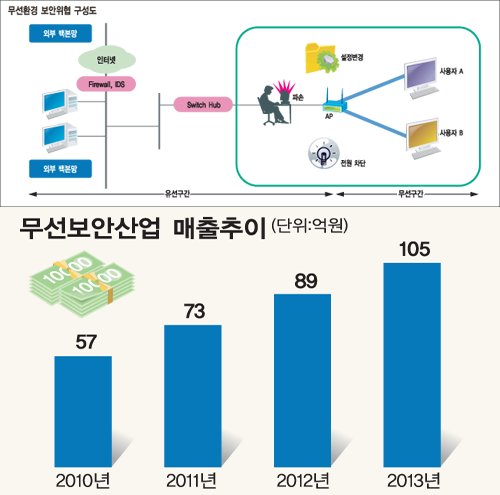
◇무선랜 불법 도청ㆍ모바일 보안 위협 증가=노트북이나 태블릿PC 등 외부에서 이뤄지는 업무는 주로 무선랜을 통해 인터넷 접속이 이뤄지는 만큼 이를 노리는 해커들의 각종 해킹 시도가 증가하는 추세입니다. 무선랜 이용자가 해커가 제공한 가짜 액세스포인트(AP)에 접속할 경우 이용자의 개인정보를 탈취하고 정보를 도용해 다양한 범죄에 활용합니다. 전문가들은 특히 와이파이존에서의 금융거래 서비스는 되도록 사용하지 않을 것을 권장하고 있습니다.

또한 라우터, 방화벽 등 이른바 `인터넷 관문구간'에 침입방지시스템(IPS) 등 보안솔루션을 집중적으로 배치해도 PC와 바로 연결되는 무선 AP가 뚫리면 내부 네트워크가 해커에게 장악될 수 있는만큼 인증 및 암호시스템 구축 등이 필요합니다고 전문가들은 조언하고 있습니다.

스마트폰 취약점을 노린 모바일 보안 위협도 증가하고 있습니다. 해커들은 강력한 신호를 보내는 공짜 무선AP로 이용자 스마트폰을 연결해 개인정보를 탈취하거나 암호화되지 않은 무선AP를 쓰는 이용자의 패스워드를 노출시키는 기법 등을 스마트폰 사용자들의 정보를 호시탐탐 노리고 있습니다.

모바일 기기가 악성코드에 감염되면 기기오동작은 물론, 정보유출, 도청, 불법과금 등 각종 피해가 확산될 수 있습니다. 해커가 개인정보를 파악해 특정인을 대상으로 한 피싱 공격을 하는 일도 빈번하게 일어납니다.

업계에서는 스마트폰의 분실ㆍ도난으로 인한 데이터 유출 관리를 위해 `원격잠금기능'이나 `기기 초기화' 등의 기능을 제공하는 MDM(모바일단말관리)솔루션을 내놓고 있습니다. 외산제품 위주로 성장해온 국내 MDM 시장은 인포섹, 루멘소프트, 지란지교소프트 등에서 속속 관련 솔루션을 출시하면서 내년 MDM 시장의 부흥기를 꿈꾸고 있습니다.

전문가들은 모바일 보안 대책으로 △무선통신 도ㆍ감청을 막기 위한 송수신 데이터 암호화 △네트워크 구성 기기의 인증 △앱스토어 사전 검증 절차 강화 △단말 내부 저장 파일 암호화 등을 권장하고 있습니다.

◇클라우드-네트워크 보안위협 기업 투자 망설이게 해=각종 포털에서 제공하는 클라우드 데이터베이스 환경에서 나타날 수 있는 위협도 주의해야 할 요소입니다. 국내에서도 KT와 다음, 네이버 등 주요 통신사와 포털사들이 언제 어디서나 스마트기기로 문서를 업로드할 수 있는 공용 클라우드 서비스를 제공하고 있습니다.

하지만 클라우드 환경에서 네트워크 보안과 가상화 기술의 일부 취약점, 내부유출 문제 등이 숙제로 남아 클라우드 환경을 구축하려는 기업들의 투자를 주저하게 만들고 있습니다.

또 패킷 스니핑(가로채기)이나 상용인터넷망을 이용한 해킹에 대비해 유ㆍ무선통합망(FMC) 관련 인증장비와 WIPS(무선랜침입탐지시스템) 등을 도입하고 모바일 플랫폼 접속은 이동통신망(CDMA, WCDMA, 와이브로)을 통해 하고 상대적으로 보안이 취약한 와이파이는 FMC에 한 해서만 접속하는 등 네트워크와 서버의 보안 취약점도 늘 눈 여겨 봐야 할 사항입니다.

시만텍코리아 윤광택 이사는 "클라우드 저장소 이용자들은 서버 운영자가 마음만 먹으면 자료를 불법적으로 볼 개연성이 있고, 해커들이 데이터센터 자체를 해킹해 회사 내부 정보에 침입할 수 있다는 점을 늘 감안하면서 업로드ㆍ다운로드 하는 중요 문서에 암호를 걸어놓는 등 생활 속 보안을 실천해야 한다"고 강조했습니다.

신동규기자 dkshin@

오픈 소스 클라우드 분석

IaaS(Infrastructure as a Service)를 위한 빌딩 블록

[출처] http://www.ibm.com/developerworks/kr/library/os-cloud-anatomy/

M. Tim Jones, Consultant Engineer, Emulex Corp.

요약: 이제 더 이상 신생 기술이 아닌 클라우드 컴퓨팅은 애플리케이션을 사용하고 개발하는 방법을 근본적으로 바꿔 놓은 유용하고 중요한 기술입니다. 예상대로 Linux?玲? 오픈 소스가 클라우드의 기반(공용 및 개인용 인프라를 위한)을 제공합니다. 이 기사에서는 클라우드, 클라우드의 아키텍처 및 이러한 동적이고 확장 가능한 컴퓨팅 및 저장소 플랫폼을 개발하는 데 사용된 오픈 소스 기술에 대해 자세히 설명합니다.

이 기사에 태그: 개요, 클라우드

원문 게재일: 2010 년 3 월 09 일
번역 게재일: 2010 년 4 월 13 일
난이도: 중급
영어로: 보기
페이지뷰: 5336 회
의견: 0 (보기 | 의견 추가 - 로그인)

평균 평가 등급 4 개 총 4표 평균 평가 등급 (4 투표수)
아티클 순위

분산 시스템 즉, 인터넷에서는 클라우드를 추상적 개념으로 사용하는 것이 매우 일반화되어 있다. 하지만 지난 몇 년 동안 이 추상적 개념은 로컬 또는 원격으로 손쉽게 서비스로 제공할 수 있는 높은 수준의 가상화된 확장 가능한 인프라로 확장되었다. 이 기사에서는 클라우드 아키텍처에 대한 자세한 정의와 장점에 대해서는 다루지 않는다. 대신 참고자료 섹션을 참조하기 바란다.

클라우드 컴퓨팅 분석

이 기사에서는 먼저 클라우드 아키텍처의 핵심 추상적 개념인 IaaS(Infrastructure as a Service)부터 시작하여 빌딩 블록을 거쳐서 높은 수준의 통합 솔루션까지 살펴본다.

자주 사용하는 약어

  • API: Application programming interface
  • I/O: Input/output
  • SLA: Service-level agreement
  • UI: User interface

요구사항은 아닐지라도 가상화는 동적으로 확장 가능한 아키텍처를 빌드하는 데 도움이 되는 고유한 장점을 제공한다. 확장성 외에도 가상화는 로드 밸런싱을 위해 실제 서버 간에 VM(virtual machine)을 마이그레이션하는 기능도 제공한다. 그림 1에서는 VMM(virtual machine monitor)이라고도 하는 하이퍼바이저라는 소프트웨어 계층에서 가상화 구성 요소를 제공하는 것을 볼 수 있다. 이 계층에서는 하나의 물리적 시스템에서 여러 운영 체제(및 해당 애플리케이션)를 동시에 실행할 수 있는 기능을 제공한다. 하이퍼바이저 위에는 가상 머신이라는 오브젝트가 있으며, 이 오브젝트에는 운영 체제, 애플리케이션 및 구성이 포함되어 있다. 선택적으로 장치 에뮬레이션을 하이퍼바이저에서 또는 VM으로서 제공할 수 있다. 마지막으로, 가상화의 새로운 동적 특성과 가상화의 새로운 기능을 관리하기 위한 새로운 관리 스키마가 필요하다. 이 관리는 서버에서의 로컬 관리를 통해 계층에서 가장 적합하며, 뿐만 아니라 상위 레벨 인프라 관리를 가상 환경에 대한 전체적인 조정 기능을 통해 상위 레벨 인프라 관리에도 적합하다.


그림 1. 클라우드에 있는 노드의 핵심 요소
핵심 클라우드 요소의 계층 보기를 보여 주는 아키텍처 도표

공유 스토리지를 사용하는 실제 네트워크에 그림 1과 같은 노드를 여러 개 배치하고, 전체 인프라에 대한 관리를 조정하고, 캐싱 및 필터링을 통해 수신 연결(개인용 또는 공용 설정에 상관 없이)에 대한 프론트엔드 로드 밸런싱을 제공하면 클라우드라는 가상 환경이 완성된다. 그림 2에서는 이 새로운 구조를 보여 준다. 이 구조에서 유휴 시스템은 추가 계산 성능이 필요할 때까지 유휴 상태로 유지될 수 있으며(전력 효율 향상) VM을 통해 각 노드의 개별 로드에 따라 노드간 밸런스가 조정되며, 심지어는 동적으로도 조정된다.


그림 2. 클라우드 컴퓨팅 인프라
실제 네트워크/스토리지부터 시작하여 사용자/인터넷까지의 클라우드의 다양한 상호 작용 계층을 보여 주는 다이어그램

클라우드의 기본 아키텍처를 정의했으므로 이제 동적 클라우드 인프라를 구축할 때 오픈 소스가 적용되는 부분을 살펴보자.


핵심 오픈 소스 기술

Linux 환경에서는 클라우드 소프트웨어 패키지의 가상화, 관리 및 대규모 통합을 위한 가상화된 인프라에 중점을 둔 개발의 물결이 나타나고 있다. 먼저 개별 노드 레벨에서의 오픈 소스를 살펴본 다음 인프라 레벨에서 어떤 변화가 나타나고 있는지 살펴보자.

하이퍼바이저

노드 레벨에서의 클라우드의 기본은 하이퍼바이저이다. 가상화는 요구사항이 아니다. 그렇다고 하더라도 가상화가 확장 가능하고 전력 효율이 높은 아키텍처에 필요한 기능을 제공한다는 데는 논쟁의 여지가 없다. 수많은 오픈 소스 가상화 솔루션이 있기는 하지만 Linux 운영 체제를 하이퍼바이저로 변환하는 두 가지 주요 솔루션으로는 Linux KVM(Kernel VirtualMachine)과 Lguest가 있다. KVM은 프로덕션 환경에 전개된 공식 하이퍼바이저 솔루션이며, Lguest는 Linux VM만을 실행하는 Linux 중심적 솔루션이지만 커널에 통합되어 있으며 더 많이 사용되고 있다.

Linux를 하이퍼바이저로 변환하는 솔루션 외에 게스트 VM 중심적 방법을 사용하는 다른 솔루션도 있다. UML(User-Mode Linux)은 게스트 Linux 커널을 수정하여 하이퍼바이저 확장 없이 다른 Linux 운영 체제에서 실행되도록 수정하는 또 다른 접근법이다. 대부분의 사용자가 수정되지 않은 커널을 실행하기를 원하기 때문에 전체 가상화 솔루션(예를 들어, KVM)이 주로 사용된다.

이 UML 접근법도 많이 사용되고 있기는 하지만 가상화된 하드웨어(예를 들어, 콘솔, 가상 디스크 및 네트워크)가 필요하다.

장치 에뮬레이션

하이퍼바이저는 여러 운영 체제에서 CPU를 공유할 수 있는 방법을 제공한다(CPU 가상화). 하지만 전체 가상화를 제공하기 위해서는 VM에 대해 전체 환경이 가상화되어야 한다. 시스템 또는 플랫폼 에뮬레이션은 여러 가지 방법으로 수행될 수 있지만 수많은 하이퍼바이저를 지원하는 인기 있는 오픈 소스 패키지로는 QEMU가 있다. QEMU는 완전한 에뮬레이터이자 하이퍼바이저이다. 하지만 KVM에서는 장치 에뮬레이션을 위해 사용자 공간에 있는 별도의 프로세스로서 QEMU를 사용한다(그림 1 참조). QEMU의 한 가지 흥미로운 특징은 QEMU가 디스크 에뮬레이션을 제공하기(QCOW 형식을 통해) 때문에 스냅샷 및 라이브 VM 마이그레이션 등의 다른 고급 기능도 제공한다는 것이다.

KVM에서는 커널 2.6.25 이후부터 I/O 가상화 성능을 최적화하는 방법으로 virtio를 사용하고 있다. Virtio는 게스트의 후크를 사용하여 의사 가상화된 드라이버를 하이퍼바이저에 도입하여 실제 장치에 가까운 수준의 성능을 제공하는 방식으로 최적화를 수행한다. 이 방법은 이 목적을 위해 운영 체제를 수정할 수 있는 경우에만 사용할 수 있지만 Linux 하이퍼바이저에서 실행되는 Linux 게스트 시나리오에서 사례를 찾아볼 수 있다.

오늘날에는 virtio와 QEMU가 함께 작동하므로 사용자 공간에 있는 Linux 게스트와 QEMU 에뮬레이터 간에 에뮬레이트된 장치 트랜잭션을 최적화할 수 있다.

가상 네트워킹

VM이 실제 서버에 통합됨에 따라 플랫폼에 대한 네트워킹 요구가 높아지고 있다. 하지만 VM의 모든 네트워킹을 플랫폼의 실제 계층에서 처리하는 대신 로컬 통신 자체를 가상화할 수 있다. VM 간의 네트워크 통신을 최적화하기 위해 가상 스위치가 도입되었다. vSwitch는 실제 스위치처럼 동작하지만 플랫폼 내에 가상화되어 있다(그림 3 참조). 이 그림에서는 VM에 연결된 가상화된 인터페이스(VIF)가 가상 스위치를 통해 실제 인터페이스(PIF)와 통신한다.


그림 3. Open vSwitch와 가상 및 실제 인터페이스
실제 도메인, 실제 인터페이스, 가상 인터페이스 및 VM이 아래부터 차례대로 쌓여 있는 계층을 보여 주는 다이어그램

오픈 소스는 매우 흥미로운 솔루션인 Open vSwitch를 사용하여 이 문제를 효과적으로 해결하고 있다. vSwitch는 가상 환경을 위한 가상 스위치를 제공할 뿐만 아니라 실제 플랫폼을 통합하고 VLAN(virtual local area network), 우선순위 기반 QoS(Quality of Service), 트렁크 및 하드웨어 가속 지원(예를 들어, 단일 루트 IOV(I/O virtualization) 네트워크 어댑터) 등의 엔터프라이즈 레벨 기능도 제공할 수 있다. Open vSwitch는 현재 2.6.15 커널에서 사용할 수 있으며 다양한 Linux 기반 가상화 솔루션(Xen, KVM, VirtualBox) 및 관리 표준(RSPAN(Remote Switched Port Analyzer), NetFlow 등)을 지원한다.

VM 도구 및 기술

VM은 운영 체제, 루트 파일 시스템 및 구성의 집합체이므로 도구 개발을 위한 공간으로 충분히 사용할 수 있다. 하지만 VM 및 도구의 모든 가능성을 실현하려면 VM 및 도구를 조립할 수 있는 이식 가능한 방법이 필요하다. 최신 방법인 OVF(Open Virtualization Format)는 유연하고, 효율적이며, 이식 가능한 VM 구조이다. OVF는 VM의 구성을 정의하는 XML 랩퍼로 가상 디스크 이미지를 랩핑하며, 이 구성에는 네트워킹 구성과 프로세서 및 메모리 요구사항을 비롯하여 이미지 및 플랫폼 요구사항을 추가로 정의하기 위한 확장 가능한 다양한 메타데이터가 포함된다. OVF의 주요 기능은 하이퍼바이저에 관계 없이 VM을 분배할 수 있는 이식성이다.

VMI(VM image)를 관리하고 다른 형식으로 변환하는 기능을 제공하는 수많은 유틸리티가 있다. VMware의 ovftool은 VMI 변환을(예를 들어, VMDK(VMware Virtual Disk Development Kit) 형식을 OVF로 변환) 위해 사용할 수 있는 유용한 도구이다. 이 도구를 비롯한 여러 도구는 VMI가 있을 때만 유용하다. 하지만 실제 서버를 VMI로 변환하려는 경우에는 어떤 도구를 사용해야 할까? 이 목적에 적합한 Clonezilla라는 유용한 도구를 사용할 수 있다. 이 도구는 원래 재해 복구를 위한 디스크 복제 도구로 개발되었지만 실제 서버 인스턴스를 VM으로 변환하여 가상화된 인프라에 쉽게 전개할 때도 사용할 수 있다. OVF 형식이 채택되면서 변환 및 관리를 위한 여러 다른 도구(예를 들어, libvirt 기반의 유틸리티)가 개발되었거나 개발 중에 있다.

로컬 관리

이 기사에서는 두 가지 관점에서 관리를 살펴본다. 이 섹션에서는 플랫폼 관리를 설명하며, 다음 섹션에서는 상위 레벨의 인프라 관리에 대해 설명한다.

Red Hat에서는 libvirt 라이브러리를 플랫폼 가상화(하이퍼바이저 및 VM)를 관리하기 위한 API로 도입했다. Libvirt가 흥미로운 이유는 수많은 하이퍼바이저 솔루션(KVM 및 Xen 등)을 지원하고 수많은 언어(예를 들어, C, Python 및 Ruby)에 대한 API 바인딩을 제공하기 때문이다. Libvirt는 플랫폼 하이퍼바이저와의 직접적인 인터페이스를 통해 API를 더 큰 인프라 관리 솔루션으로 확장하는 "최종 관리 단계"를 제공한다. Libvirt를 사용하면 VM을 쉽게 시작하고 중지할 수 있을 뿐만 아니라 API를 사용하여 플랫폼 간에 VM을 마이그레이트하는 등의 고급 작업도 수행할 수 있다. 또한 libvirt 기반의 쉘인 virsh도 사용할 수 있다.


인프라 오픈 소스 기술

지금까지 가상화된 노드 레벨의 오픈 소스 솔루션 중 일부를 살펴보았으며 이제부터는 이 인프라를 지원하는 다른 몇 가지 오픈 소스 애플리케이션을 살펴보자. 이 기사에서는 세 가지 범주를 살펴본다. 처음 두 범주는 앞에서 설명한 솔루션을 보완하는 인프라 레벨 기술이다. 세 번째 범주는 손쉽게 전개할 수 있도록 모든 기능을 모아 놓은 통합 솔루션으로 구성되어 있다.

I/O 기술

확장 가능하고 밸런스가 잘 잡힌 웹 아키텍처를 개발하기 위해서는 백엔드 기능을 구현한 서버 간의 웹 트래픽에 대한 밸런스를 조정하는 기능의 역할이 중요하다. 수많은 로드 밸런싱 솔루션이 있지만 최근에 Yahoo!에서 Traffic Server라는 솔루션의 소스를 공개했다. Traffic Server는 세션 관리, 인증, 필터링, 로드 밸런싱 및 라우팅을 비롯하여 클라우드 인프라에 필요한 수많은 기능을 하나의 패키지로 묶어 놓았다는 점이 흥미롭다. Yahoo!에서는 처음에 이 제품을 Inktomi로부터 인수한 이후 제품을 확장하여 오픈 소스로 공개했다.

인프라 관리

대규모 인프라 관리(많은 하이퍼바이저 및 추가 VM 관리)는 수많은 방법으로 수행할 수 있으며, 그 중에서 동일한 플랫폼(libvirt)을 기반으로 개발된 일반적인 두 가지 솔루션이 있다. oVirt 패키지는 소수의 VM에서부터 시작하여 수백 개의 호스트에서 실행되는 수천 개의 VM으로 확장할 수 있는 오픈 VM 관리 도구이다. Red Hat에서 개발한 oVirt 패키지는 일반적인 관리 기능과 함께 자동화된 클러스터링 및 로드 밸런싱 기능도 지원하는 웹 기반 관리 콘솔이다. oVirt 도구는 Python 언어로 작성되었다. 마찬가지로 Red Hat에서 libvirt를 기반으로 개발한 VirtManager는 웹 기반인 oVirt와는 달리 GTK+ UI를 사용하는 애플리케이션이다. VirtManager는 훨씬 더 많은 그래픽 기능을 제공하며(실시간 성능 및 자원 활용을 위해) 원격 VM에 대한 전체 그래픽 콘솔로 사용할 수 있는 VNC 클라이언트 뷰어를 포함하고 있다.

그리고 Puppet은 데이터 센터 인프라(클라우드)를 위해 설계된 또 하나의 오픈 소스 패키지이다. 가상화된 인프라만을 위해 설계된 것은 아니지만 이 제품을 사용하면 피어 운영 체제의 세부 사항을 추상화하여 대형 인프라 관리를 단순화할 수 있다. 이 작업은 Puppet 언어를 사용하여 수행된다. Puppet은 많은 수의 서버에 대한 관리 작업을 자동화하는 데 이상적이며 오늘날 널리 사용되고 있다.


통합 IaaS 솔루션

다음과 같은 오픈 소스 패키지에서는 모든 필수 기능(가상화, 관리, 인터페이스 및 보안 포함)을 단일 패키지로 통합하는 포괄적인 방법을 사용한다. 이러한 패키지를 서버 및 스토리지 네트워크에 추가하면 유연한 클라우드 컴퓨팅 및 스토리지 인프라(IaaS)를 구축할 수 있다. 이러한 플랫폼에 대한 자세한 정보는 참고자료를 참조하기 바란다.

Eucalyptus

Eucalyptus(Elastic Utility Computing Architecture for Linking Your Programs to Useful Systems)는 클라우드 컴퓨팅 인프라를 구축하는 데 사용되는 가장 인기 있는 오픈 소스 패키지 중 하나이다. 이 패키지의 독특한 점은 인터페이스가 Amazon의 클라우드 컴퓨팅 인터페이스인 Amazon EC2(Amazon Elastic Compute Cloud)와 호환된다는 점이다. 또한 Eucalyptus에는 Amazon의 클라우드 스토리지 인터페이스인 Amazon S3(Amazon Simple Storage Service)와 호환되는 Walrus가 포함되어 있다.

Eucalyptus는 하이퍼바이저를 위해 KVM/Linux 및 Xen을 지원하며 클러스터 관리를 위한 Rocks 클러스터 배포판을 포함하고 있다.

OpenNebula

OpenNebula는 Universidad Complutense de Madrid에서 개발한 또 하나의 흥미로운 오픈 소스 애플리케이션이다(Apache 라이센스를 따름). OpenNebula는 개인용 클라우드 구조를 지원할 뿐만 아니라 하이브리드 클라우드라는 아이디어도 지원한다. 하이브리드 클라우드는 개인용 클라우드 인프라와 공용 클라우드 인프라(예를 들어, Amazon)를 결합하여 확장 수준을 한층 더 높일 수 있다.

OpenNebula는 Xen, KVM/Linux 및 VMware를 지원하며 libvirt와 같은 요소를 사용하여 관리 및 검사 작업을 수행한다.

Nimbus

Nimbus는 과학적 컴퓨팅에 중점을 둔 또 하나의 IaaS 솔루션이다. Nimbus를 사용하면 Amazon EC2에서 제공하는 것과 같은 원격 자원을 임대한 후 로컬에서 이들 자원을 관리할 수 있다(구성, VM 전개, 모니터링 등). Nimbus는 Globus.org의 일부인 Workspace Service 프로젝트의 변형이며, Amazon EC2를 이용하여 Xen과 KVM/Linux를 지원한다.

Xen Cloud Platform

Citrix에서는 Xen을 IaaS 플랫폼에 통합했으며, 이때 Open vSwitch 등의 다른 오픈 소스 기능을 통합하는 동안 Xen을 하이퍼바이저로 사용했다. Xen 솔루션의 흥미로운 장점은 Kensho 프로젝트의 표준 기반 관리(OVF, DTMF(Distributed Management Task Force), CIM(Common Information Model) 및 VMAN(Virtualization Management Initiative) 포함)에 중점을 두고 있다는 점이다. Xen 관리 스택은 SLA 보증과 함께 비용 정산(charge-back)을 위한 세부 기준도 지원한다.

OpenQRM

마지막으로 소개하지만 중요한 솔루션인 OpenQRM은 데이터 센터 관리 플랫폼을 분류된다. OpenQRM은 가상화된 전체 데이터 센터를 관리하는 단일 콘솔로 써드파티 도구를 통합할 수 있는 플러그인 가능한 아키텍처로 구성되어 있다. OpenQRM은 고가용성을 위한 지원(중복성 활용)이 통합하고 KVM/Linux, Xen, VMware 및 Linux VServer를 포함한 다양한 하이퍼바이저를 지원한다.


추가 주제

클라우드 및 가상화 도메인에서 오픈 소스가 주도적인 역할을 담당하고 있는 분야에 대해 할 말은 많지만 이 기사에서는 오늘날 사용할 수 있고 인기가 높은 가시적인 일부 솔루션만을 간략히 소개했다. 자신의 고유한 요구사항에 따라 개별 구성 요소부터 클라우드를 구축하려거나 처음부터 작동하는 종합적인 솔루션을 원하든지 상관 없이 오픈 소스를 통해 모든 것을 구할 수 있다. 여기에서 설명한 솔루션을 포함한 여러 솔루션에 대한 자세한 정보를 보려면 참고자료를 참조하기 바란다.


참고자료

교육

제품 및 기술 얻기

URL Rewrite : 동적 URL 지정 : creating Dynamic URL

만일 Http://comphy.kr/indexi.htm&key=somthing 의 url을 http://comphy.kr/somthing등으로

간단하게 표현하는 방법을 알아보쟈...

* Java [출처] http://jace.tistory.com/59

urlrewrite를 사용한지가 대략 1년 반정도 인것 같다.
이번에 진행하고 있는 프로젝트에서 다시 사용하면서 늦었지만 포스팅을 해본다.

사이트 : http://tuckey.org/urlrewrite/

UrlRewrite는 apache의 mod_rewrite 모듈에 기반하며
이것을 J2EE환경에서 사용할 수 있도록 구성한 것이다.

현재 version은 2.6, 3.0이 존재한다.
두 version 사용법에 있어 크게 다른점이 없으므로 아무거나 다운받아 사용해도 무관한다.
beta version이긴 하지만 새로운 3.0을 소개해 본다.

Install

  1. urlrewrite파일을 다운로드 한다. (다운로드 후 zip파일 압축해제)
  2. 다음구문을 WEB-INF/web.xml에 추가한다.
        <filter>       <filter-name>UrlRewriteFilter</filter-name>       <filter-class>org.tuckey.web.filters.urlrewrite.UrlRewriteFilter</filter-class>    </filter>    <filter-mapping>       <filter-name>UrlRewriteFilter</filter-name>       <url-pattern>/*</url-pattern>    </filter-mapping>        
  3. urlrewrite.xml 파일을 WEB-INF/ 하위에 생성한다.

Filter Parameters

filter에기술 될 수 있는 parameter들은 다음과 같다.

    <filter>        <filter-name>UrlRewriteFilter</filter-name>        <filter-class>org.tuckey.web.filters.urlrewrite.UrlRewriteFilter</filter-class>        <!-- set the amount of seconds the conf file will be checked for reload        can be a valid integer (0 denotes check every time,        -1 denotes no reload check, default -1) -->        <init-param>            <param-name>confReloadCheckInterval</param-name>            <param-value>60</param-value>        </init-param>        <!-- 설정파일 경로 (2.6버전에선 설정파일의 위치를 변경시킬 수 없었음        본인의 경우 2.6소스를 다운받아 설정파일을 로드하는 클래스를 변경했던 기억이...        (default /WEB-INF/urlrewrite.xml) -->        <init-param>            <param-name>confPath</param-name>            <param-value>/WEB-INF/urlrewrite.xml</param-value>        </init-param>        <!-- 로그레벨임. log4j를 이용하므로 log4j의 레벨과 동일함.        (default WARN) -->        <init-param>            <param-name>logLevel</param-name>            <param-value>DEBUG</param-value>        </init-param>        <!-- you can change status path so that it does not        conflict with your installed apps (note, defaults        to /rewrite-status) note, must start with / -->        <init-param>            <param-name>statusPath</param-name>            <param-value>/status</param-value>        </init-param>        <!-- you can disable status page if desired        can be: true, false (default true) -->        <init-param>            <param-name>statusEnabled</param-name>            <param-value>true</param-value>        </init-param>        <!-- you may want to allow more hosts to look at the status page        statusEnabledOnHosts is a comma delimited list of hosts, * can        be used as a wildcard (defaults to "localhost, local, 127.0.0.1") -->        <init-param>            <param-name>statusEnabledOnHosts</param-name>            <param-value>localhost, dev.*.myco.com, *.uat.mycom.com</param-value>        </init-param>    </filter>    <filter-mapping>        <filter-name>UrlRewriteFilter</filter-name>        <url-pattern>/*</url-pattern>    </filter-mapping>

WEB-INF/urlrewrite.xml 설정

샘플은 다음과 같다.

    <?xml version="1.0" encoding="utf-8"?>    <!DOCTYPE urlrewrite        PUBLIC "-//tuckey.org//DTD UrlRewrite 3.0//EN"        "http://tuckey.org/res/dtds/urlrewrite3.0.dtd">    <urlrewrite>        <rule>           <from>^/some/olddir/(.*)$</from>           <to type="redirect">/very/newdir/$1</to>        </rule>        <rule match-type="wildcard">           <from>/blog/archive/**</from>           <to type="redirect">/roller/history/$1</to>        </rule>        <outbound-rule>            <from>^/world.jsp?country=([a-z]+)&amp;city=([a-z]+)$</from>            <to>/world/$1/$2</to>        </outbound-rule>    </urlrewrite>


    rule과 outbount-rule을 주로 사용하여 설정을 구성하며
rule은 from 패턴으로 요청시 to를 통해서 처리토록 설정하는것이며,
반대로 outbount-rule은 from 패턴의 uri가 요청시 to패턴으로 display하게 된다.

예를 들어 http://domain/rss/feed/1 이라는 uri를
http://domain/rss.jsp?feed=1 로 처리토록 한 경우
사용자의 브라우저의 주소는 http://domain/rss.jsp?feed=1 요렇게 display되는데
이때 outbount-rule를 이용하여 다시 http://domain/rss/feed/1 요렇게
보여지도록 구성할때 사용되는것이다.
자세한 사항은 해당 사이트의 manual을 참조하도록한다.

* 닷넷. MS dotNet [출처] http://www.dotnetfunda.com/articles/article1568-url-rewritingvirtual-url.aspx

URL REWRITING/VIRTUAL URL

Let us assume that ,we need to display the user public profile information in viewprofile.aspx page

Generally we pass the user id in the qurey string like ”viewprofile.aspx?id=100” . We fetch data using id value and displays the information .

If client request s you to url format to be like http://yoursite.com/ publicprofile /username

For that type of cases we use the url rewriting concepts .


Introduction

In this article we will learn url rewriting ,virtual url concepts

URL rewriting is the process of accepting an incoming Web request and automatically redirecting it to a different URL.


Using the code

Create publicprofile” directory in your web application.

Global.asax

voidApplication_BeginRequest(object sender, EventArgs e)

{

stringCurrentPath = Request.Url.ToString();

if(CurrentPath.Contains("/publicprofile/"))

{

HttpContextMyContext = HttpContext.Current;

stringurl = CurrentPath.Substring(0,CurrentPath.LastIndexOf("/"));

stringusername = CurrentPath.Substring(CurrentPath.LastIndexOf("/"));

username = username.Replace("/", "");

if(CurrentPath[CurrentPath.Length - 1].ToString() == "/")

{

HttpContext.Current.Response.Status = "301 Moved Permanently";

HttpContext.Current.Response.AddHeader("Location",

Request.Url.ToString().Replace(CurrentPath, url));

}

else

{

MyContext.RewritePath("index.aspx?uname=" + username);

}

}

}

Place “Index.aspx” in “publicprofile”directory.

Index.aspx.cs

protected void Page_Load(objectsender, EventArgs e)

{

if(Request.QueryString["uname"] != "")

{

int id = Validateuser.getId(Request.QueryString["uname"].ToString());

if(id != 0)

{

ProfileInfo(id);

}

else

{

Response.Redirect(“http://yoursite.com/?err=1");

}

}

else

{

Response.Redirect(“http://yoursite.com/?err=1");

}

}

protected void ProfileInfo(intproID){

DataTable dt = Validateuser.getprofile(proID);

//Code to assign values to controls……

}

Web.config:

<httpModules>

<add name="UrlRoutingModule" type="System.Web.Routing.UrlRoutingModule, System.Web.Routing, Version=3.5.0.0, Culture=neutral, PublicKeyToken=31BF3856AD364E35" />

</httpModules>


Conclusion

The above code works for the following urls http://yoursite.com/ publicprofile /username,

publicprofile /username/,publicprofile /username//…

Launch Java Applications from Assembly Language Programs

{cs.r.title}


Java Native Interface (JNI) is a mechanism that can be used to establish communication between native language programs and the Java virtual machine. The  documentation for JNI and the technical literature on JNI deal extensively with interactions between the JVM and C/C++ code. The Java SDK even provides a utility to generate a header file to facilitate calling C/C++ programs from Java code. However, there is hardly any mention of Java andassembly language code working together. In an earlier article I showed how assembly language programs can be called from Java applications. Here I deal with the technique for invoking Java programs from an ASM process through a demo application that calls a Java method from assembly language code. The Java method brings up a Swing JDialog to show that it has, indeed, been launched.

Why Java with ASM?

JNI is essential to the implementation of Java, since the JVM needs to interact with the native platform to implement some of its functionality. Apart from that, however, use of Java classes can often be an attractive supplement to applications written in other languages, as Java offers a wide selection of APIs that makes implementation of advanced functions very simple.

Some time ago, I was associated with an application to collect real-time data from a number of sources and save them in circular buffers so that new data would overwrite old data once the buffer got filled up. If a designated trigger event was sensed through a digital input, a fixed number of data samples would be saved in the buffers so that a snapshot of pre- and post-trigger data would be available. The original application was written in assembly language. After the application was used for a few months, it was felt that it would be very useful to have the application mail the snapshots to authorized supervisors whenever the trigger event occurred. Of course, it would have been possible to write this extension in assembly, but the team felt that in that particular instance it was easier to write that extension in Java and hook it up with the ASM program. As I had earlier worked with ASM-oriented JNI, I knew this could be done and, indeed, the project was implemented quickly and successfully.

I am sure there are many legacy applications written in assembly language that could benefit from such add-ons. However, it is not only for old applications in need of renovation that JNI can prove useful. Although it may seem unlikely to some of us, assembly language is still used for writing selected portions of new programs. In an article published not very long ago, the author says, "I have found that many of Sun's partners still use assembly language in their products to ensure that hot code paths are as efficient as possible. While compilers are able to generate much more efficient code today, the resulting code still doesn't always compete with hand-coded assembly written by an engineer that knows how to squeeze performance out of each microprocessor instruction. Assembly language remains a powerful tool for optimization, granting the programmer greater control, and with judicious use can enhance performance." Clearly, in such "mixed language" applications the ability to use Java with ASM can be useful.

Note that the technique shown here can also be used to call Java code from languages other than ASM. If JInvoke is rewritten as a .dll, code written in FORTRAN, for instance, can link to it and call a Java method.

I have used JNI with legacy ASM code in two ways:

  • Functional enhancement: Mail-enabling an existing ASM application, as mentioned earlier.
  • Interface enhancement: Adding interactive user interface (mostly AWT, but some Swing as well).

These enhanced applications have run on Windows 2000 and XP. The Java versions used were 1.3, 1.4, and 1.6. In all cases the applications worked smoothly.

The version of assembly language I have used for the demo code is MASM32. The entire MASM32 bundle is a free download, and if you are going to experiment with Java-ASM interaction, you will need to have it on your computer. A set of extremely useful tutorials on MASM programming are available on Iczelion's site. The definitive work on JNI is Sheng Liang's book The Java Native Interface: Programmer's Guide and Specification. This too is a free download. This article's Java code sample,AsmToJava, will obviously need an SDK (or, at least, a JRE) for execution. The assembly language part of the demo, JInvoke, has been compiled into an .exe file and will run even without the MASM bundle; the assembler/linker is required only if you want to modify the source code and recompile it.

The Basics

JNI provides a comprehensive interface to a JVM. This interface is exposed primarily through a rich set of functions. Native code can call these functions to interact with a JVM implementation. These functions are described in detail in Sheng Liang's book. While most of these functions can be accessed only after a JVM has been created, JNI also directly exports a number of native functions. As we shall see later, a function of the second type can be used to instantiate a JVM, so that other JNI functions can be called.

Once a JVM has been created, an assembly language program can access those JNI functions that need a JVM instance to implement their functionalities. Pointers to all these JNI functions are stored in a table, the Function Table. When the ASM code loads a JVM, it receives a variable named JNIEnv, which is really a pointer. JNIEnv points to a memory location that, in turn, contains the actual pointer to the Function Table. This chain of access is shown in Figure 1.

Access to JNI functions

Figure 1. Access to JNI functions

As we see, each of the pointers to JNI functions is four bytes long. So the pointer to any given function can be found at the location defined by adding four times the index for that function to the starting address of the function table. The function indices are zero-based--the pointer for the first function is at index 0, that for the second is at index 1, and so on. In his book, Sheng Liang lists the index values for all JNI functions.

To call a Java program, ASM code needs to execute the following steps:

  • Instantiate a JVM
  • Locate the class
  • Get the ID of the method
  • Call the method

Before we look at these steps in detail, let us check out how we can use an include file to simplify the task of writing this and similar programs. As interactions between Java and native codes take place through the functions exposed by JNI, it becomes necessary for native processes to call these functions repeatedly. So we would like to use macros to take care of these activities. That would reduce the need for repeatedly writing similar (and fairly long) code and would also reduce the chances of bugs getting into the program through typos.

The Macros

Calling a function from ASM code involves getting the pointer to the function from the Function Table and then calling the function using that pointer. Getting the pointer, as we know, involves following the JNIEnv pointer chain to obtain the starting address of the Function Table and then retrieving the pointer to the desired function by using the index of the function. The first part--getting the starting address of the Function Table--would use identical code every time and can be handled by the following macro:

    ;This macro returns the pointer to     ;Function Table in fnTblPtr    GetFnTblPtr MACRO envPtr, fnTblPtr        mov ebx, envPtr        mov eax, [ebx]        mov fnTblPtr, eax    ENDM

The code shown above defines a macro that takes two parameters. The first is the JNIEnv pointer and the second points to the location where the macro will return the pointer to Function Table. The macro loads the pointer to Function Table intoeax, which is then saved in fnTblPtr. One way of using this macro would be to define it within the program itself. Another way, adapted here, is to define all such macros within an include file, which can then be used with the ASM program through an include statement. The include file used here is jav_asm.inc. This file defines not only theGetFnTblPtr macro, but also all the others that are required for this example. In addition to the macros,jav_asm.inc defines the prototype of the function that creates a JVM as well as the structs that are to be used as parameters with that function. Finally, java_asm.incassigns symbolic names to all JNI function indices to simplify their use.

Once the pointer to the Function Table has been obtained, the pointer to the desired function needs to be retrieved. The code for this too will be the same every time except for the index. The following macro performs this task:

    ;This macro returns the pointer     ;to a function in fnPtr.        GetFnPtr MACRO fnTblPtr, index, fnPtr                mov eax, index                mov ebx, 4                mul ebx                mov ebx, fnTblPtr                add ebx, eax                mov eax, [ebx]                mov fnPtr, eax        ENDM

The macro multiplies the value of index by 4 and adds the result to the starting address of Function Table (available in fnTblPtr) to get the pointer to the function we want to access. This pointer is then saved infnPtr.

The three remaining macros are almost identical; the only difference is in the number of parameters handled:

    ;The next 3 macros push parameters as per     ;stdcall and call the function through fnPtr        CallFunction2 MACRO param1, param2, fnPtr                push param2                push param1                call [fnPtr]        ENDM        CallFunction3 MACRO param1, param2, param3, fnPtr                push param3                push param2                push param1                call [fnPtr]        ENDM        CallFunction4 MACRO param1, param2, param3, param4, fnPtr                push param4                push param3                push param2                push param1                call [fnPtr]        ENDM

As we see, these macros push the parameters (exceptfnPtr) in reverse order as required forstdcall, and then call the targeted function usingfnPtr as the pointer.

Now that the basic building blocks are in place, we can take a look at the four-step sequence followed by our demo application.

Creating a JVM Instance

JInvoke creates an instance of JVM more or less in the same way as the java command does when we launch a Java application from the command line. A Java virtual machine implementation offers a mechanism known as the Invocation Interface that allows a native application to load the virtual machine. The java command calls a C program that uses the Invocation Interface to run a Java application, andJInvoke uses this same interface. The code for loading the JVM is given below:

    .    .    .    va          vm_args <>    jvmo        JavaVMOption <>    .    .    .    mov jvmo.optionString, offset opzero    mov va.options, offset jvmo    mov va.version, 00010002h    mov va.nOptions,1    mov va.ignoreUnrecognized, TRUE    invoke JNI_CreateJavaVM, offset JavaVM, offset JNIEnv,         offset va

Here we first declare two structs. As we have already seen, these structs are defined in jav_asm.inc. The creation of a JVM requires that a number of parameters be specified. These are passed to the JNI_CreateJavaVM function through the structs.

In our example, we want to invoke the main method of the AsmToJava class. On my computer, the class file is in the C:\j2sdk1.4.2_05\testjni folder. The stringopzero defines this path in accordance with the method described in the JNI specs. Note that opzero is loaded into the struct jvmo, and then the offset tojvmo is loaded into the struct va. The last parameter passed to the JNI_CreateJavaVM function is va and, therefore, the JVM that is loaded comes to know where to find the class that we are interested in.

When JNI_CreateJavaVM returns, it signals success by returning zero in eax and failure by returning a negative number in eax. If the function succeeds in creating the JVM instance, the pointer to the JVM interface and the corresponding JNIEnv pointer are available inJavaVM and JNIEnv, respectively.

On return from the JNI_CreateJavaVM function,JInvoke checks the content of eax. If it is not zero, the JVM has not been loaded. The user is informed of this and the process exits:

    .if eax == 0        .        .        .    .else        invoke MessageBox, 0, addr Fail1Text,             addr Caption, 16; failed to create JVM    .endif 

On the other hand, if the content of eax is zero, then a message box is shown (Figure 2) with the corresponding message and the next step is executed:

    .if eax == 0        invoke MessageBox, 0, addr VmText,             addr Caption, 64; indicate success

Message to show that JVM has been loaded

Figure 2. Message to show that the JVM has been loaded

I must point out here that JInvoke uses the simplest approach to JVM instantiation since it is meant to be a vehicle for concept demonstration only. A number of additional parameters can be specified, as is explained by Sheng Liang in his book.

Locating the Class

After loading the JVM, JInvoke needs to locate the class that is the entry point for the target Java application. The following code calls the FindClass function to do this:

    GetFnTblPtr JNIEnv, fntblptr    GetFnPtr fntblptr, FI_FC, fnptr ; ptr to FindClass    CallFunction2 JNIEnv, offset ProcName,         fnptr ; call FindClass    .if eax != 0        mov classid, eax        invoke MessageBox, 0, addr FcText,             addr Caption, 64; class found

Note that the path to the class was earlier loaded into the struct jvmo (mov jvmo.optionString, offset opzero) and is already known to the JVM. If the FindClass function is able to locate the class, it returns the ID in eax. Otherwise it returns zero. Once the class is located, its ID is saved and a message box so informs the user (Figure 3).

Message to show that the class has been found

Figure 3. Message to show that the class has been found

If the class cannot be located, then the process exits after showing an appropriate message. Figure 4 is an example of a message shown when a called function does not succeed.

Message to show that the class could not be found

Figure 4. Message to show that the class could not be found

Getting the Method ID

In order to call the method, the corresponding ID has to be obtained. The function that returns the ID for a static method isGetStaticMethodID. We use this function here since we want to call the main method of theAsmToJava class. The parameters for this function--in addition to JNIEnv--are:

  • The ID of the class to which the method belongs; this is theclassid variable referred to in the previous step.
  • The name of the method; this is the stringmethodname.
  • The descriptor of the method that specifies the parameters for the method and its return type; the string methodsig is the descriptor for our target method. In this case, the parameter is a String array and the return type isvoid. Sheng Liang's book on the JNI specification shows how to create descriptors for methods and for variables too.

The call to GetStaticMethodID is very similar to the other function calls we have seen so far:

    GetFnPtr fntblptr, FI_GSMID, fnptr ; ptr to GetStaticMethodID    CallFunction4 JNIEnv, classid, offset methodname,         offset methodsig, fnptr ; GetStaticMethodID    .if eax != NULL        mov methid, eax        invoke MessageBox, 0, addr GsmiText, addr Caption, 64

GetStaticMethodID returns the ID ineax. If the attempt to obtain the method ID is unsuccessful then NULL is returned instead. So JInvokechecks the content of eax to determine whether to go on to the next step (Figure 5) or exit the process.

Message to show that method ID has been obtained

Figure 5. Message to show that method ID has been obtained

Calling the Target Method

The JNI function that calls a static method with the return typevoid (remember, we are calling the mainmethod) is CallStaticVoidMethod. The following code gets the pointer to this function and calls it with the required parameters:

    GetFnPtr fntblptr, FI_CSVM, fnptr ; get CallStVM ptr    CallFunction3 JNIEnv, classid, methid, fnptr; call CallStVM

The Java application displays a dialog to show that it has been successfully launched.

Java method successfully invoked

Figure 6. Java method successfully invoked

Once the called Java method returns, JInvokeexits.

Message to show that the process is exiting

Figure 7. Message to show that the process is exiting

When the ExitProcess function is called, all threads in the process are stopped, so the Java threads created by the process will also be stopped. Therefore, if this approach is used to launch a Java program, care must be taken to ensure that the called Java method returns only after completing all required activities. Actually, the issues involved in terminating the calling process and the JVM need careful attention. Please refer to the Windows API  documentation and the latest JNI specs.

Conclusion

The approach shown here demonstrates the basic technique used for launching Java applications from assembly language code. Adequate error checking should be incorporated in native programs to ensure safe interaction with the Java environment. Sheng Liang provides many examples of checks including handling of exceptions in native code. ASM programs working with JNI should use such error checking methods wherever applicable.

The jav_asm.inc file provides an easy way of specifying JNI function indices. The use of symbolic names instead of numbers to specify an index is less likely to lead to errors. The use of macros, too, is useful in reducing errors. You are free to use this file with your code and also to modify it to suit your requirements. However, make sure that the file is not redistributed without the disclaimer.

When running JInvoke, you may get an error message saying that jvm.dll cannot be located. If this happens, you need to add the path to the directory containing jvm.dllto your PATH environment variable. This DLL is normally located in the jre\bin\client directory under the Java SDK root folder. For instance, on my computer, the path isC:\j2sdk1.4.2_05\jre\bin\client for the Java 1.4 release. If you are using Java 1.3, however, the folder would bejre\bin\classic. So make sure you've got the right path.

Finally, I would like to point out that the paths to the files named in the include statements ofJInvoke would be determined by the directory structure of your computer. The paths specified in JInvoke are valid for my computer. As far as JInvoke.exe is concerned, it will run even without any MASM component (specifically, any .inc or .lib file) being loaded into your system. If you want to modify the code and recompile it, you will have to make sure that the path details correspond to the way your directories are set up. The AsmToJava class file will have to be loaded in the directory specified byopzero. Alternately, opzero will have to be changed to reflect the path to this class. In that case, the source file for JInvoke will need to be recompiled, keeping in mind the need to modify other path names as mentioned above.

Resources

Biswajit Sarkar is an electrical engineer with specialization in Programmable Industrial Automation. Biswajit is the author of "LWUIT 1.1 for Java ME Developers" published by PACKT Publishing.


XCode 간단 설치와 사용법 - Objective-C의 예제 개발하기
[출처]XCode 간단 설치와 사용법 - Objective-C의 예제 개발하기 :
http://www.hanb.co.kr/network/view.html?bi_id=1623

1. 이 글의 목적

Objective-C : 맥과 아이폰 애플리케이션 프로그래밍이 Objective-C 본연의 내용에 충실하기 위해 개발 툴인 Xcode에 대해서는 의도적으로 설명이 배제되어 있습니다. 이에 Xcode를 사용해서 Objective-C의 예제를 개발하고 싶은 독자를 위해 간단히 Xcode를 설치하고 프로젝트를 만드는 과정과 소스 코드를 개발, 실행하는 과정을 HelloWorld라는 친숙한 예제로 예를 들었습니다.

2. Xcode 설치

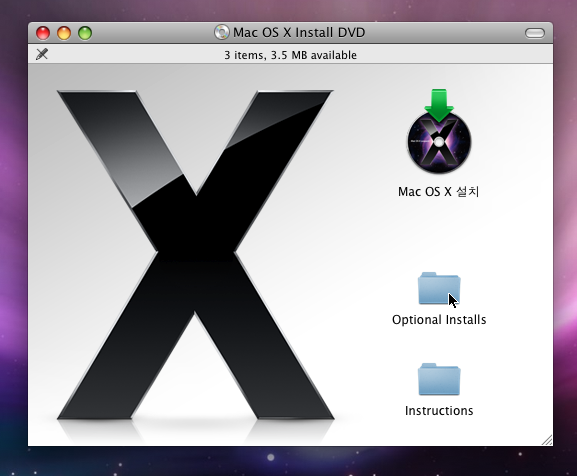
개발 툴을 설치하기 위해 Mac OS X 10.5 패키지에 들어 있는 DVD 혹은 Mac을 구입했을 때 제공된된 DVD를 본체의 DVD 드라이브에 넣습니다. 이 책에서는 Mac 구입 시 제공된 DVD를 사용하였습니다. DVD의 내용을 Finder로 보면 'Optional Install'이라는 항목이 나오는데 이것을 열어봅니다.

null

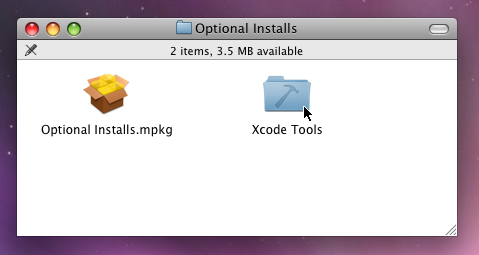
그리고 'Xcode Tools'라는 폴더를 엽니다.

null

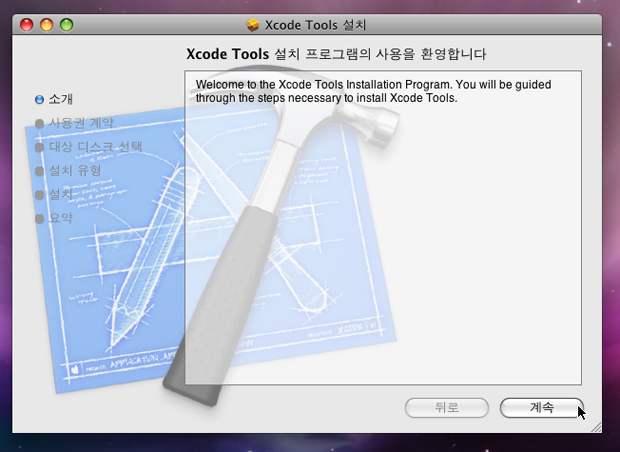
'Xcode Tools.mpkg'를 더블 클릭하면 설치 프로그램이 실행됩니다.

null

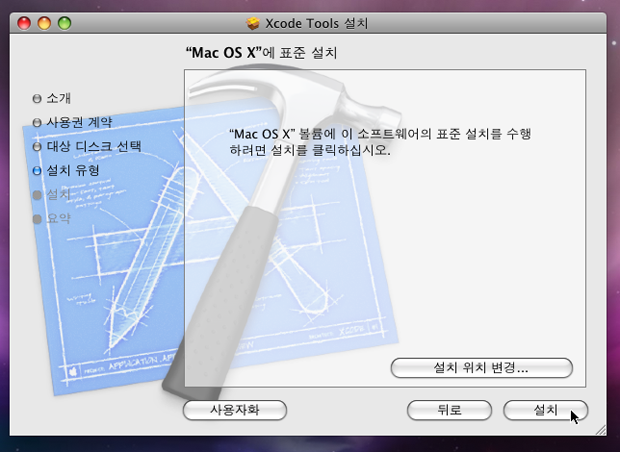
설치 프로그램이 실행되면 사용권 계약과 설치 확인 화면 등이 차례대로 나오는데 화면에 나오는 지시에 따라 설치를 계속하면 됩니다.

null

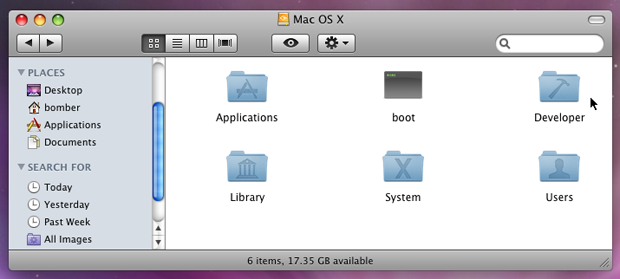
설치 프로그램이 종료되면 지정한 드라이브에 'Developer'라는 이름으로 폴더가 만들어집니다.

null

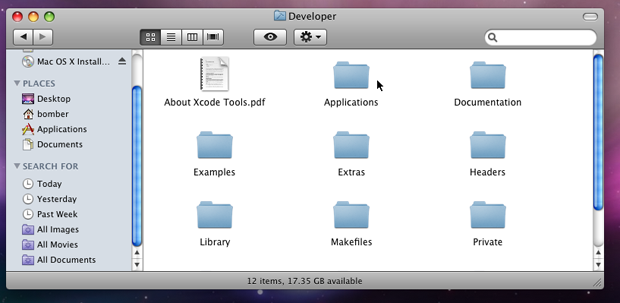
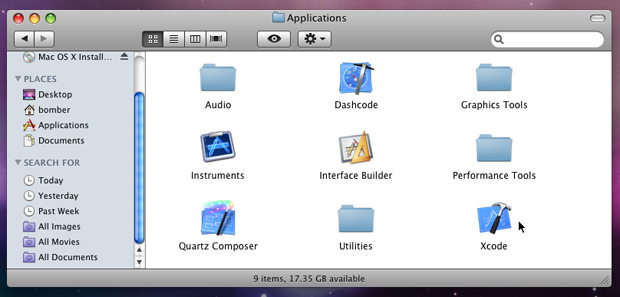
이 폴더 안에는 개발에 필요한 애플리케이션과 기술 자료, 샘플 코드들이 들어 있는데 이것들을 통틀어서 'Developer Tools'라고 부릅니다. 프로그램 개발을 위한 애플리케이션은 'Applications' 폴더에 들어 있으므로 이 폴더를 열어봅니다.

null

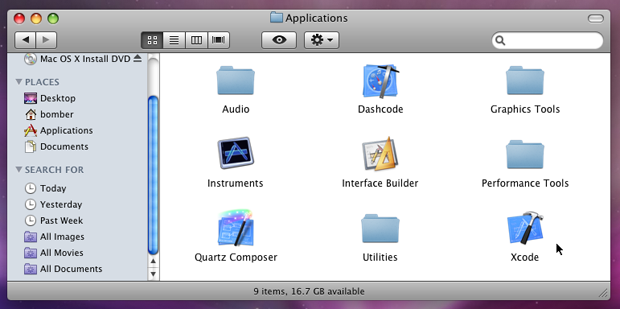
이 폴더 안에서 주로 사용하는 애플리케이션이 'Xcode'와 'Interface Builder'입니다.

null

3. Xcode 실행하기

Developer 폴더 안에 있는 Applications 폴더에서 Xcode 아이콘을 찾아 더블 클릭하면 Xcode가 실행됩니다.

null

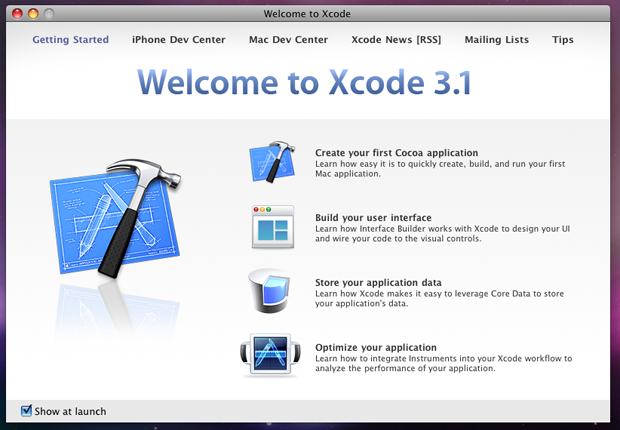
Xcode가 처음 실행되면 네비게이션 윈도우가 표시됩니다(설정에 따라 나오지 않을 수도 있습니다).

null

영문으로 표시되는 각 항목을 클릭하면 별도의 창이 뜨면서 해당 기술 자료가 표시 됩니다. 윈도우 왼쪽 아래에 있는 'Show at launch'를 끄면 다음 실행부터 네비게이션 윈도우가 표시되지 않습니다.

4. 신규 프로젝트 만들기

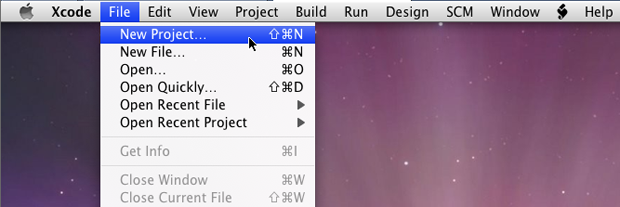
Xcode의 기본적인 사용 방법을 이해하기 위해 새로 프로젝트를 만들어봅니다. 파일 메뉴에서 'New Project'를 선택합니다.

null

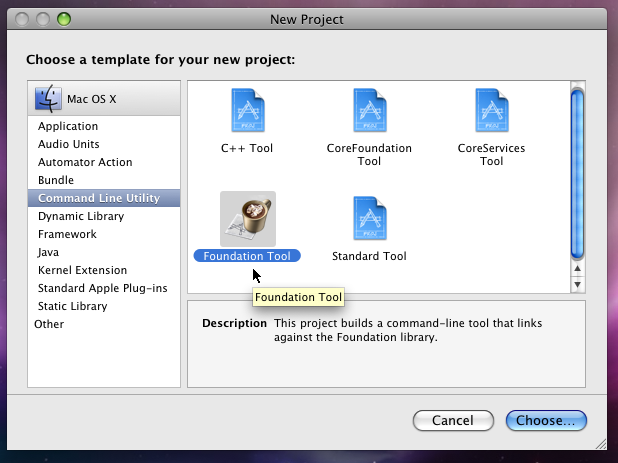
신규 프로젝트의 템플릿을 선택하기 위한 다이얼로그 창이 뜹니다. 왼쪽 리스트에서 'Command Line Utility'를 선택한 후, 오른쪽 아이콘들 중 'Foundation Tool'을 선택합니다. 참고로 3장에서는 'Cocoa Application'을 선택했었는데 이번 예제는 윈도우나 버튼과 같은 유저 인터페이스가 없기 때문에 'Foundation Tool' 형태로 만듭니다. 여기까지 선택이 되었으면 우측 하단의 'Choose' 버튼을 클릭합니다.

null

프로젝트 폴더의 저장 위치를 결정하기 위한 시트 다이얼로그 창이 뜹니다. 이름을 'HelloWorld'라고 정하고 저장 위치를 'Desktop'으로 지정한 후, 'Save' 버튼을 클릭합니다.

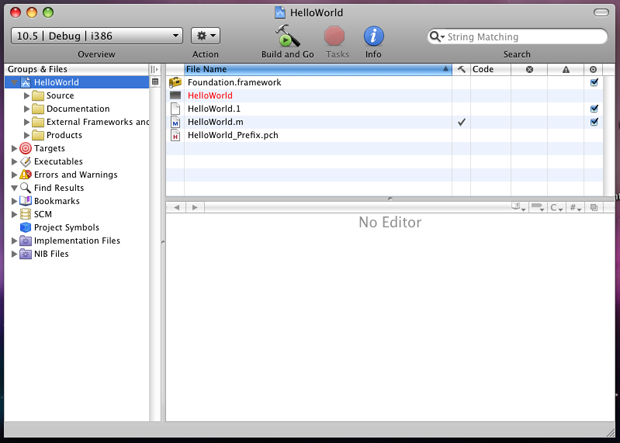
프로젝트 윈도우 창이 뜹니다.

null

5. 빌드하고 실행하기

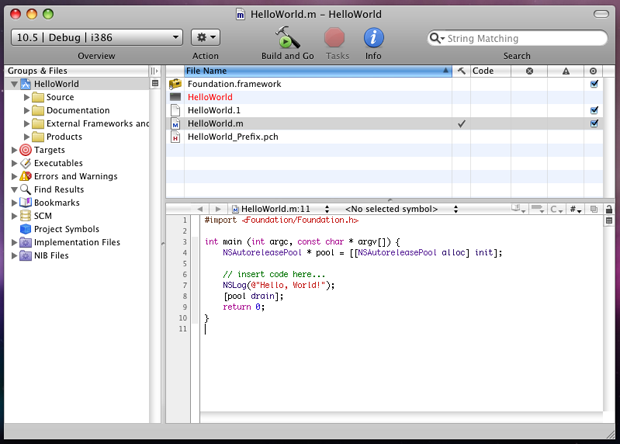
우측 상단의 파일 목록에서 HelloWorld.m 파일을 선택하면 우측 하단의 편집기에 파일 내용이 표시됩니다.

null

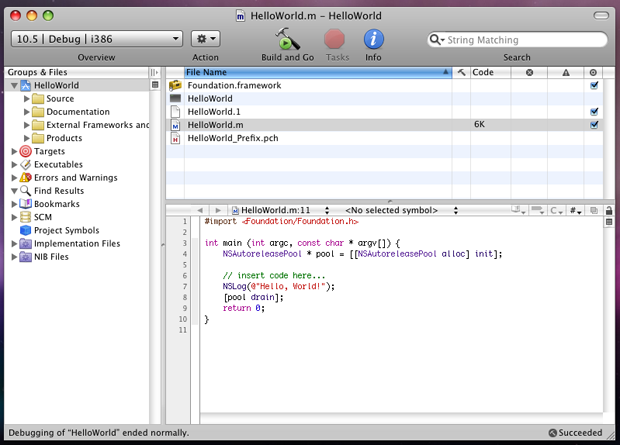
참고로 Xcode는 프로젝트명과 동일한 이름으로 main 함수를 가지는 구현 파일을 자동으로 생성합니다. 그리고 바로 실행이 가능하도록 NSLog에 "Hello, World!"를 출력하도록 되어 있습니다. 우선은 현재 이 상태에서 그래도 빌드하고 실행해 봅니다. 툴 바에 있는 'Build and Go' 버튼을 클릭합니다.

null

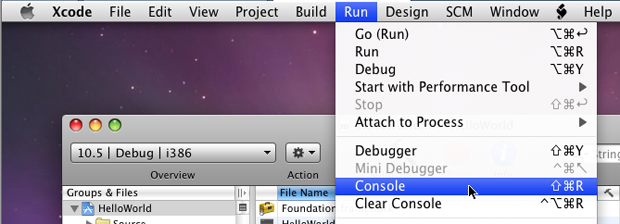
우측 상단 파일 목록에는 Code 항목에 빌드된 파일의 크기가 표시되고 우측 하단에는 빌드가 성공했음을 표시하는 'Succeeded'를 볼 수 있습니다. 이제 실행을 시켜 보겠습니다. 메뉴 바에서 'Run'을 선택한 후, 펼쳐지는 항목들에서 'Console'을 클릭합니다.

null

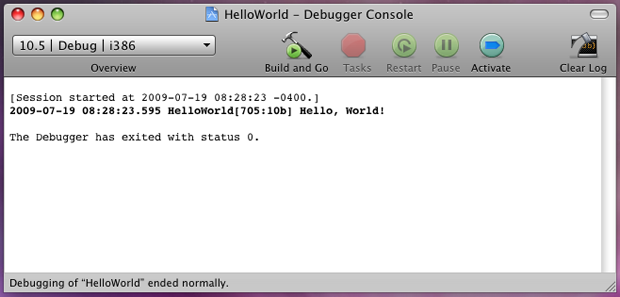
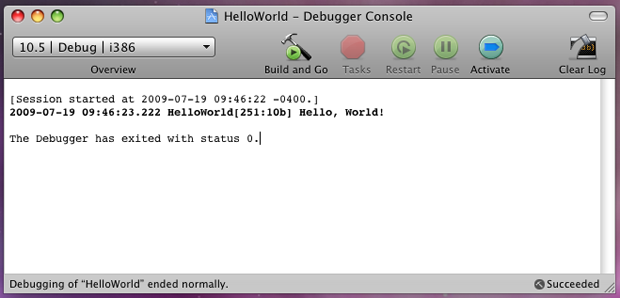
실행 결과는 아래와 같습니다.

null

소스 코드를 손을 대지 않은 상태에서 그냥 프로젝트를 만든 후, 기본 파일을 빌드하고 실행만 하더라도 간단한 "Hello, World!" 메시지를 출력하여 정상 동작하는 것을 확인하였습니다.다만 이는 C언어에서의 개발과 같이 객체지향적인 개념을 아직 사용하지 않았습니다.

본격적으로 객체지향적은 개념을 도입하기 위해 "Hello, World!" 출력을 해주는 MyHelloWorld 객체를 만들어 보겠습니다.

MyHelloWorld 클래스 만들기

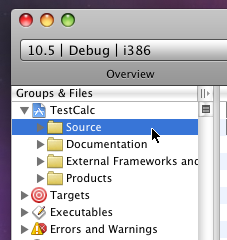
프로젝트 윈도우의 왼쪽에 있는 'Groups & Files' 목록에서 'Source' 항목을 선택합니다.

null

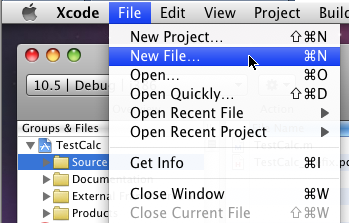
파일 메뉴에서 'New File'을 선택합니다.

null

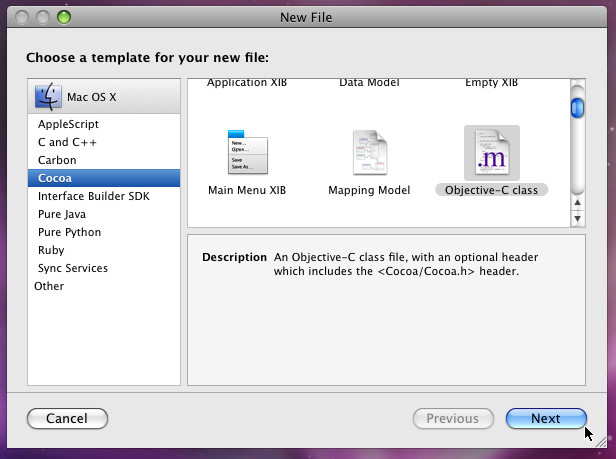
신규 파일의 템플릿을 선택하기 위한 다이얼로그 창이 뜹니다.

null

왼쪽 리스트에서 'Cocoa'를 선택한 후, 오른쪽 아이콘 중에서 'Objective-C class'를 선택합니다. 'Next' 버튼을 누르면 저장 위치를 묻는 시트 다이얼로그 창이 뜹니다.

null

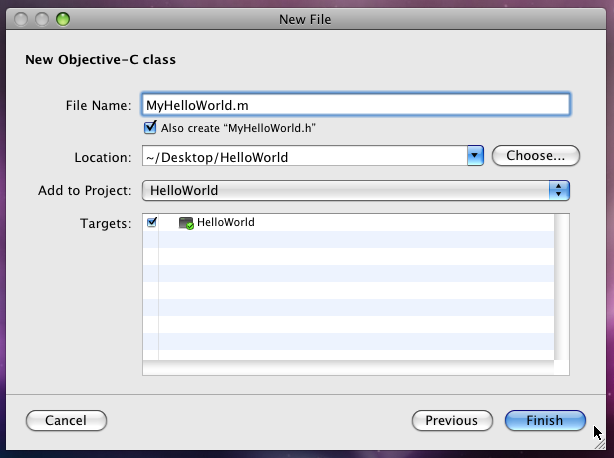
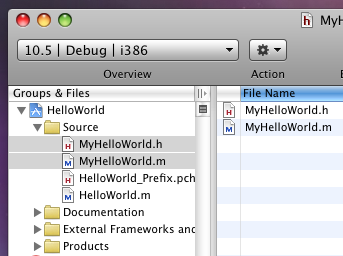
파일명을 'MyHelloWorld.m'으로 지정하고 저장 위치가 프로젝트 폴더 안에 있는 것을 확인한 후, 'Finish' 버튼을 클릭합니다. 'Groups & Files' 목록의 'Source'에 MyHelloWorld.m과 MyHelloWorld.h가 등록된 것을 알 수 있습니다.

null

MyHelloWorld 인터페이스 개발하기

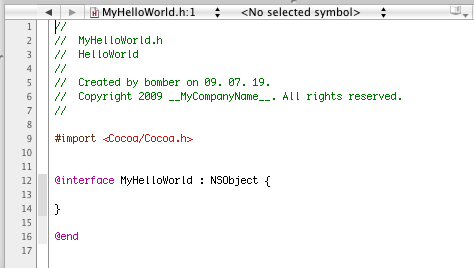
이미 만들어진 MyHelloWorld.h를 선택해서 편집기에 불러들이면 아래와 같이 기본 골격이 만들어져 있습니다.

null

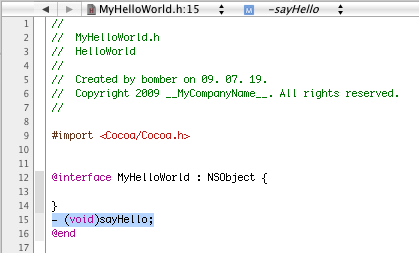
여기에 "Hello, World!"를 출력하기 위한 sayHello 메소드를 추가합니다.

null

이제는 이 메소드를 구현할 차례입니다.

6. MyHelloWorld 구현코드 개발하기

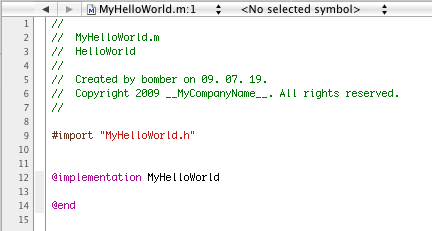
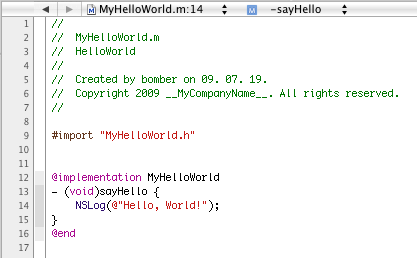
이미 만들어진 MyHelloWorld.m을 선택해서 편집기에 불러들이면 아래와 같이 기본 골격이 만들어져 있습니다.

null

여기에 방금 추가한 sayHello 메소드를 구현합니다.

null

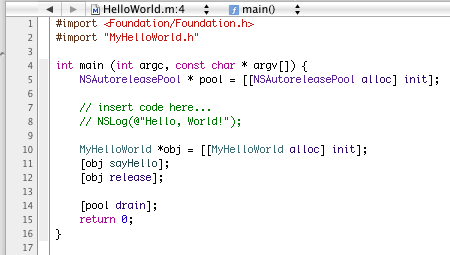
이제 MyHelloWorld에 대한 인터페이스와 구현이 완성되었으니 원래 있던 HelloWorld.m이 이것을 사용하도록 수정합니다. 참고로 자동으로 생성된 코드는 주석으로 막았습니다.

null

이제 앞서 해본 것과 같이 빌드와 실행을 해 봅니다.

null

앞서 HelloWorld.m에서 직접 "Hello, World!" 메시지를 찍었던 것을 MyHelloWorld 객체를 통해서 메시지를 찍도록 리팩토링되었습니다.

7. 마무리

이제까지 Xcode를 사용한 간단한 HelloWorld 예제를 만들어 보았습니다. Objective-C에 보다 집중하기 위해 저자는 Xcode의 사용 방법에 대해서는 의도적으로 배제해 두었습니다만, Vim이나 Emacs 편집기 사용이 불편한 개발자에게는 Xcode의 편집 기능이 유용할 것입니다.


Introduction

Android source code is maintained in two code bases: the Android Linux kernel (kernel directory) and Android platform and applications (device directory). This  document provides a high-level introduction to the source code organization and an overview of the major components of each primary directory.

Android Source

Linux Kernel

The Android Linux kernel includes enhancements to the Linux 2.6 kernel that provide additional drivers to support the Android platform, including:

  • Binder: an OpenBinder-based driver to facilitate inter-process communication (IPC) in the Android platform.
  • Android Power Management: a light weight power management driver built on top of standard Linux power management but optimized for embedded systems.
  • Low Memory Killer: Based on hints from the userspace, the low memory killer can kill off processes to free up memory as necessary. It is designed to provide more flexibility than the Out Of Memory (OOM) killer in the standard kernel.
  • Logger: A light weight logging device used to capture system, radio, logdata, etc.
  • USB Gadget: Uses the USB function framework.
  • Android/PMEM: The PMEM (physical memory) driver is used to provide contiguous physical memory regions to userspace libraries that interact with the digital signal processor (DSP) and other hardware that cannot cope with scatter-gather.
  • Android Alarm: A driver which provides timers that can wake the device up from sleep and a monotonic timebase that runs while the device is asleep.

Look for Android-specific enhancements in the following directories:

  • /drivers/android
  • /drivers/misc
  • /include/linux

Android Platform and Applications

The following list outlines the directory structure found within the device branch of Android source code:

  • apps : Core Android applications such as Phone, Camera, and Calendar.
  • boot : Reference Android bootloader and other boot-related source code.
  • commands : Common Android commands, the most important of which is the runtime command, which does much of the initialization of the system.
  • config : System-wide makefiles and linker scripts.
  • content : Standard Android ContentProvider modules.
  • dalvik : Android runtime Virtual Machine (VM).
  • data : Fonts, keymaps, sounds, timezone information, etc.
  • docs : Full set of Android  documentation.
  • extlibs : Non-Android libraries. This directory is intended to host unmodified external code. None of the libraries included within this directory rely on Android headers or libraries.
  • ide : Tools for support of the IDE's used to write Android applications.
  • include : Android system headers for inclusion.
  • java : Android core APIs, as well as some external libraries.
  • libs : Android-specific C++ based libraries.
  • partner : Project-specific source code for various proprietary components.
  • prebuilt : Prebuilt tools, like the toolchains and emulator binary.
  • product : Device-specific configuration files. This directory will include a subdirectory for each new device.
  • samples : Sample applications.
  • servers : C++ based system servers.
  • system : Core of the embedded Linux platform at the heart of Android. These essential bits are required for basic booting, operation, and debugging.
  • tests : Platform and application test cases.
  • tools : Tools for building and debugging Android (of particular interest for porting are "adb" and "emulator").

Java Spring 2.0 Web 예제(Hello World)

이전 포스트(Spring Framework 다운로드) 참조 => http://blog.naver.com/sungback/90036900896

0. http://www.springsource.org/download 링크를 따라가서

spring-framework-2.5.6-with-dependencies.zip 을 다운받아 압축 해제한다.

1. 이클립스에서 File -> New -> Dynamic Web Project -> hellospring 이라고 하자.

2. WEB-INF -> lib 폴더에 아래 그림처럼 jar 파일을 복사한다.

1) 압축 해제 폴더\dist\spring.jar

2) 압축 해제 폴더\dist\modules\spring-webmvc.jar

3) 압축 해제 폴더\lib\jakarta-commons\commons-logging.jar

3. web.xml 을 아래와 같이 수정한다.

<?xml version="1.0" encoding="UTF-8"?>
<web-app xmlns:xsi="http://www.w3.org/2001/XMLSchema-instance"
xmlns="http://java.sun.com/xml/ns/javaee" xmlns:web="http://java.sun.com/xml/ns/javaee/web-app_2_5.xsd"
xsi:schemaLocation="http://java.sun.com/xml/ns/javaee http://java.sun.com/xml/ns/javaee/web-app_2_5.xsd"
id="WebApp_ID" version="2.5">
<display-name>hellospring</display-name>
<servlet>
<servlet-name>spring2</servlet-name>
<servlet-class>org.springframework.web.servlet.DispatcherServlet</servlet-class>
<load-on-startup>1</load-on-startup>
</servlet>

<servlet-mapping>
<servlet-name>spring2</servlet-name>
<url-pattern>*.htm</url-pattern>
</servlet-mapping>

<welcome-file-list>
<welcome-file>index.html</welcome-file>
<welcome-file>index.htm</welcome-file>
<welcome-file>index.jsp</welcome-file>
<welcome-file>default.html</welcome-file>
<welcome-file>default.htm</welcome-file>
<welcome-file>default.jsp</welcome-file>
</welcome-file-list>
</web-app>

4. Java Resource: src -> 우클릭 -> New -> Class

아래 소스 작성

package hellospring.web;

import! javax.servlet.http.HttpServletRequest;
import! javax.servlet.http.HttpServletResponse;
import! org.apache.commons.logging.Log;
import! org.apache.commons.logging.LogFactory;
import! org.springframework.web.servlet.ModelAndView;
import! org.springframework.web.servlet.mvc.Controller;

public class HelloController implements Controller {
protected final Log logger = LogFactory.getLog(getClass());

@Override
public ModelAndView handleRequest(HttpServletRequest request,
HttpServletResponse response) throws Exception {
logger.info("hello 예제 정상 작동");//로그 메세지 보여준다.
request.setAttribute("name", "홍길동");//name 홍길동 셋팅.
return new ModelAndView("hello.jsp");//hello.jsp 로 가라.

}
}

5. WebContent -> 우클릭 -> JSP -> hello.jsp

<%@ page language="java" contentType="text/html; charset=UTF-8"
pageEncoding="UTF-8"%>
<html>
<head>
<meta http-equiv="Content-Type" content="text/html; charset=UTF-8">
<title>Hello Spring 예제</title>
</head>
<body>
<h3>Hello Spring 예제</h3>
Hello!!! <%=request.getAttribute("name") %>
</body>
</html>

6. WEB-INF -> 우클릭 -> spring2-servlet.xml -> [Finish]

규칙 : web.xml 에서 정의한 서블릿 이름인 spring2-servlet.xml 로 만들어야 한다.

아래의 소스를 작성한다. (url 인 /hello.htm 을 처리할 클래스 HelloController 에 맵핑시킨다..)

<?xml version="1.0" encoding="UTF-8"?>

<beans xmlns="http://www.springframework.org/schema/beans"
xmlns:xsi="http://www.w3.org/2001/XMLSchema-instance"
xsi:schemaLocation="http://www.springframework.org/schema/beans
http://www.springframework.org/schema/beans/spring-beans-2.5.xsd">

<bean name="/hello.htm" class="hellospring.web.HelloController"/>

</beans>

7. 서버 시작 후 http://localhost:8080/hellospring/hello.htm 테스트.

[출처] 이클립스 첫번째 Spring 예제(Hello World)|작성자 메멘토

kernel.org가 아닌 구글에서 안드로이드 소스 다운로드 및 빌드

* 결국 kernel.org는 복구가 안돼네요. 구글에서 안드로이드 소스를 공유하기로 하고,

제 3자인 kernel.org에 소스를 위탁했던 것 같은데, 이젠 구글에서 직업 배포합니다.

* Linux 64bit version을 컴퓨터에 설치 후

소스만 2GB이므로 빌드 환경을 위해서는 10GB 이상이 요구됩니다.

* 1. JDK 설치

$ sudo add-apt-repository "deb http://archive.ubuntu.com/ubuntu hardy main multiverse"
$ sudo add-apt-repository "deb http://archive.ubuntu.com/ubuntu hardy-updates main multiverse"
$ sudo apt-get update
$ sudo apt-get install sun-java5-jdk

sudo add-apt-repository "deb http://archive.canonical.com/ lucid partner"
$ sudo add-apt-repository "deb-src http://archive.canonical.com/ubuntu lucid partner"
$ sudo apt-get update
$ sudo apt-get install sun-java6-jdk

* 2. 빌드 환경을 위한 유틸리티 설치

$ sudo apt-get install git-core gnupg flex bison gperf build-essential \
zip curl zlib1g-dev libc6-dev lib32ncurses5-dev ia32-libs \
x11proto-core-dev libx11-dev lib32readline5-dev lib32z-dev \
libgl1-mesa-dev g++-multilib mingw32 tofrodos python-markdown \
libxml2-utils

* 3. 소스 다운로드를 위한 repo 설치

$ mkdir ~/bin
$ PATH=~/bin:$PATH
$ curl https://dl-ssl.google.com/dl/googlesource/git-repo/repo > ~/bin/repo
$ chmod a+x ~/bin/repo

* 4. repo 초기화

$ repo init -u https://android.googlesource.com/platform/manifest

* 5. 소스 다운로드

$ repo sync

기존 kernel.org 에서 다운로드 하던 방식에서 변경된 것은

repo 초기화가 주소가 https://android.googlesource.com/platform/manifest

으로 변경된 것입니다.

* 6. 소스 빌드

$make


'Computer Science' 카테고리의 다른 글

Android : Source Code Overview  (0) 2011.11.10
Java Spring 2.0 Web 예제(Hello World)  (0) 2011.11.09
[알아봅시다] 샵 메일  (0) 2011.11.06
spring + iBatis 연동하기  (0) 2011.11.02
스프링 - 아이바티스 연동  (0) 2011.11.02

[알아봅시다] 샵 메일

메일 보내고도 안보냈다 발뺌 못해
'내용증명' 역할 톡톡

신동규 기자dkshin@dt.co.kr | 입력: 2011-11-03 20:24

[2011년 11월 04일자 18면 기사]

@자리에 # 도입한 형태
계정등록해 서비스 이용
이메일 분쟁 대폭 줄 듯

1990년대 후반부터 대중화되기 시작한 이메일을 통한 소통은 우리 생활과 뗄 수 없는 `산소'같은 존재가 돼 버렸습니다. 거래처와의 의사소통에서 친구들과 안부를 주고받는 일까지 이메일 없이 지금같이 원활한 의사소통을 상상할 수 있을까요.

하지만 이메일을 통해 주고받은 내용이 누군가에 의해 소송에 걸리고 법정 안의 공방으로 이어진다면 이야기가 달라집니다. 현행법상 이메일 등 전자플랫폼으로 문서를 주고 받은 것을 공식적으로 입증할 수 있는 명확한 규정이 없습니다. 각종 계약서를 둘러싼 소송에서 송수신자가 메일을 보내거나 받아놓고도 `오리발'을 내밀 경우 법적으로 이를 명확하게 입증할 방법이 없었기 때문입니다.

하지만 `샵(#)메일'이 도입되면 이 같은 전자문서 송수신 및 유통을 둘러싼 분쟁이 상당부문 줄어들 전망입니다. 오늘은 기존 이메일 기능에 `내용증명' 기능을 크게 강화한 `샵메일'에 대해 알아보겠습니다.

지난달 27일 지식경제부 산하 정보통신산업진흥원(NIPA)은 `샵메일' 서비스를 개시한다고 발표했습니다. 이에 따라 샵메일 서비스를 원하는 개인이나 법인 등은 NIPA가 등록대행 계약을 체결한 공인전자문서보관소 홈페이지를 방문해 전자공인주소 계정을 등록하고 샵메일을 발급받을 수 있습니다. 현재는 KTNET이 1호 사업자로 선정돼 샵메일 등록 대행기관의 첫 장을 열었고 삼성SDS, 유퍼스트뱅크, 코스콤 등이 추가 사업자 선정을 기다리고 있습니다. NIPA 회계팀은 외부 단체와의 계약서 작성시 샵메일을 통해 문서를 주고받는 시범사업에 나섰습니다.
◇메일 주소에 @(at)대신 #(sharp) 사용= 샵메일은 `사용자계정(ID)+구분기호(#)+기업/개인명.kr'으로 구성됩니다. 예를 들어 ABC전자 기획팀의 경우 PLAN#ABC.co.kr, 정보통신산업진흥원 전자문서팀의 경우 e- document#nipa.or.kr로 표기되는 식입니다. 기존 이메일에서 `@'이 들어가는 자리에 샵(#)을 도입한 형태입니다.

이메일과 샵메일의 가장 큰 차이점은 샵메일이 `내용증명' 기능을 갖추고 있다는 점입니다. 샵메일에서는 송신자가 자신이 메일을 송신하고 보내지 않았다고 부인하거나 수신자가 메일을 수신한 후 수신하지 않았다고 부인할 수 없어 각종 소송 등에서 사실관계를 입증할 수 있는 데 크게 기여할 것으로 기대하고 있습니다. 또한 공인전자문서보관소를 통해 문서의 유통을 증명하는 유통증명서(송신, 수신, 열람)를 공인전자문서보관소에 보관, 법적 증거력을 확보하고 스팸메일 관리와 악성코드로부터 메일 서비스를 보호ㆍ관리할 수 있는 기능을 갖췄습니다.

◇`계약서ㆍ증명서' 송수신시 분쟁 줄여=정부 및 관련업계는 샵메일 서비스가 본격화되면, 다양한 형태의 비즈니스 모델이 나타날 것으로 기대하고 있습니다. 정부ㆍ공공ㆍ기업간 문서 송수신부터 민간 부문의 계약ㆍ고지ㆍ통보 등에 이르기까지 다양한 영역에서 샵메일의 내용증명 기능이 역할을 할 것으로 전망됩니다. 졸업증명서, 가족관계증명서 등 11개 부문에 걸쳐 작년부터 시범사업을 시행해온 지식경제부는 샵메일 개시와 더불어 전자문서 업계 등 관련 업계가 활기를 띌 것으로 기대하고 있습니다. 샵메일 서비스가 본격적으로 탄력을 받기 위해서는 10월 말 국회에 제출된 전자거래기본법 개정안이 올해 국회를 통과해야 합니다. 이 개정안이 통과되면 기존 법안의 전자문서의 `보관' 기능에 `유통'기능까지 합법화돼 샵메일 서비스가 날개를 달 것으로 전망됩니다.
◇보안 문제 해소가 확대 관건= 샵메일의 다양한 특장점에도 불구하고 자신의 메일기록이 제3의 장소에 보관된다는 사실에 일각에서는 우려를 하기도 합니다.

NIPA 전자문서팀 안대섭 팀장은 "현재 포털업체들에서 쓰고 있는 이메일의 내용이 어디서 어떻게 쓰이고 있는지 알 수 있느냐"며 "공인전자문서보관소 관리자들이 메일의 내용을 열람할 수 없도록 하고 있으며 지식경제부에서 1년 단위로 사업자들에 대한 신뢰성 및 메일열람 여부를 조사하는 등 안전한 중개자 역할을 할 것"이라고 말했습니다. 지식경제부 관계자도 "샵메일 관리를 맡게 되는 민간사업자들은 신원조회 등 공무원과 같은 강도의 도덕적인 규제가 가해져 객관적인 관리와 안전성 문제는 안심해도 될 것"이라고 강조했습니다.

신동규 기자 dkshin@

자료=정보통신산업진흥원

[저작권자 ⓒ디지털타임스 무단 전재-재배포 금지]

spring + iBatis 연동하기

[출처] http://suicide102.egloos.com/2283394

1. web.xml 설정

: 아래의 설정은 spring과 iBatis의 연동과는 상관이 없는 설정내용입니다. 아래 설정은 WEB-INF/spring-config/ 에 있는 applicationContext로 시작하는 xml 파일을 웹어플리케이션이 시작될때 읽도록 하기 위해 설정하였습니다.(밑에 설명을 위해 참고로 설명)

<?xml version="1.0" encoding="UTF-8"?>

<web-app>

...

<context-param>
<param-name>contextConfigLocation</param-name>
<param-value>
/WEB-INF/spring-config/applicationContext*.xml</param-value>
</context-param>

...

</web-app>

2. applicationContext.xml 설정

: spring 관련 설정들은 프로젝트의 규모에 따라 업무단위 또는 웹어플리케이션 계층(layer)단위로 나누기도 합니다. 나는 업무단위로 설정파일을 나누었으며, 일반적인 설정(dataSource,messageSource등)을 이 파일에서 설정하였습니다.

2.1. sqlMapClient 설정하기!

<?xml version="1.0" encoding="UTF-8"?>

<beans xmlns="http://www.springframework.org/schema/beans"
xmlns:p="
http://www.springframework.org/schema/p"
xmlns:xsi="
http://www.w3.org/2001/XMLSchema-instance"
xsi:schemaLocation="
http://www.springframework.org/schema/beans
http://www.springframework.org/schema/beans/spring-beans-2.0.xsd">

...

<bean id="dataSource"
class="org.apache.commons.dbcp.BasicDataSource"
p:driverClassName="com.mysql.jdbc.Driver"
p:url="jdbc:mysql://localhost:3306/spring?characterEncoding=euckr"
p:username="javajigi" p:password="password" />

<bean id="
sqlMapClient" class="org.springframework.orm.ibatis.SqlMapClientFactoryBean">
<property name="configLocation" value="
classpath:spring/mvc/sample/mapper/maps/sqlMapConfig.xml" />
<property name="dataSource" ref="dataSource" />
</bean>

...

</beans>

3. sqlMapConfig.xml 설정

<?xml version="1.0" encoding="UTF-8"?>
<!DOCTYPE sqlMapConfig PUBLIC "-//ibatis.apache.org//DTD SQL Map Config 2.0//EN"
"
http://ibatis.apache.org/dtd/sql-map-config-2.dtd">

<sqlMapConfig>

<!-- Optimizing Setting -->
<settings enhancementEnabled="true" useStatementNamespaces="true" />

<!-- Sql Map 설정 -->
<sqlMap resource="spring/mvc/sample/common/model/mapper/maps/sqlMap-Board.xml" />

</sqlMapConfig>

참고> settings의 요소

azyLoadingEnabaled 적재지연은 정보를 필요한 때에만 읽어 들이고 다른 데이터는 명시적인 요청이 있을 때가지 적재를 미루는 기술이다.
cacheModelsEnabled 캐싱은 성능을 향상시키는 기법으로 최근 사용된 데이타가 미래에 다시 사용될 것이라고 가정하고 메모리에 계속저장해 두는 것
enhancementEnabled 이 설정은 CGLIB에 최적화된 클래스를 통해 적재 지연 성능을 향상시킬지 여부를 지정
|참고| CGLIB는 실행시간에 코드를 생성하는 라이브러리이다. 다른 성능 향상 기법들 처럼 꼭 필요하다고 생각되지 않으면 사용하지 않는 것이 좋다.
useStatementNameSpace name space 사용 여부
maxRequest, maxSessions,maxTransactions 사용하기를 권장하지 않는다.
maxRequest 이것은 한꺼번에 SQL문을 수행할 수 있는 쓰레드의 수. 셋팅값 보다 많은 쓰레드는 다른 쓰레드가 수행을 완료할때까지 블록된다. 다른 DBMS는 다른 제한을 가진다. 이것은 최소한 10개의 maxTransactions이고 언제나 maxSessions과 maxTransactions보다 크다. 종종 동시요청값의 최대치를 줄이면 성능향상을 보여준다.
예:
maxRequests=”256”
Default: 512
maxSessions 이것은 주어진 시간동안 활성될수 있는 세션의 수이다. 세션은 명시적으로 주어질수도 있고 프로그램적으로 요청될수도 있고 쓰레드가 SqlMapClient 인스턴스를 사용할때마다 자동적으로 생성될수도 있다. 이것은 언제나 maxTransaction보다 같거나 커야 하고 maxRequests보다 작아야 한다. 동시세션값의 최대치를 줄이면 전체적인 메모리사용량을 줄일수 있다.
예:
maxSessions=”64”
Default: 128
maxTransactions 이것은 한꺼번에 SqlMapClient.startTransaction()에 들어갈수 있는 쓰레드의 최대갯수이다. 셋팅값보다 많은 쓰레드는 다른 쓰레드가 나올때까지 블록된다. 다른 DBMS는 다른 제한을 가진다. 이 값은 언제나 maxSessions보다 작거나 같아야 하고 maxRequests보다 작아야 한다. 종종 동시트랜잭션의 최대치를 줄이면 성능향상을 보여준다.
예:
maxTransactions=”16”
Default: 32

4. sqlMap 예

<?xml version="1.0" encoding="EUC-KR" standalone="no"?>
<!DOCTYPE sqlMap PUBLIC "-//ibatis.apache.org//DTD SQL Map 2.0//EN"
"
http://ibatis.apache.org/dtd/sql-map-2.dtd">

<sqlMap namespace="Board">

<!-- DB 컬럼과 OBJECT 맵핑 -->

<resultMap id="boardList" class="spring.mvc.sample.board.model.Board">
<result property="boardNo" column="boardno" />
<result property="name" column="name" />
<result property="title" column="title" />
<result property="createDate" column="createDate" />
<result property="hitCount" column="hitCount" />
</resultMap>

<select id="list" resultMap="Board.boardList">
SELECT boardno, title, name, createdate, hitcount
FROM board
ORDER BY createdate DESC
</select>

</sqlMap>

5. 퍼시스턴스 계층(Persistence Layer)에서의 사용 예

...

public class IbatisWithMysqlBoardDAO extends SqlMapClientDaoSupport implements BoardDAO {

...

public List findBoardList(int currentPage, int countPerPage) throws DataAccessException,SQLException {
List result = null;
String sqlId = "
Board.list";
SqlMapClient sqlMap = this.
getSqlMapClient();
try{
result =
sqlMap.queryForList(sqlId);
}catch(SQLException ex){
throw ex;
}
return result;
}

...

}

Spring - iBatis Integration

스프링 - 아이파티스 연동

[출처] http://www.javabeat.net/articles/52-spring-ibatis-integration-1.html

1) Introduction

iBatis is an object-relational mapping tool (ORM) that simplifies access to database. This article details the steps needed for integrating iBatis with Spring. Through such an integration, objects that are specific to iBatis can utilise all the benefits given by Spring's IOC Container. This is not an introductory article for both Spring and iBatis Frameworks. First-time readers are encouraged to read the Introductory article for Spring in javabeat Introduction to Spring Web Framework to know the preliminary concepts related to Spring.

2) Step-by-Step Procedure for Integration

2.1) Introduction

We are going to create a sample table in the MySql Database and going to access the data within it using Spring-iBatis Integration. The required bundles needed to build and run the sample program are listed below.

  • Spring Distribution
  • MySql Database
  • MySql Database Driver

2.2) Creating tables

Create a table called Jsr which contains relevant information for holding information like name, id, description and specification lead for a Java Specification Request (JSR). Issue the following command in the MySql Client command prompt to create the table,

create table Jsr (JsrId varchar(10), JsrName varchar(50), JsrDescription,  varchar(500), SpecLead varchar(100));

2.3) Creating the Java Equivalent

Now let us create a equivalent Java class for the Jsr table. This class, will contain properties that will map to the column names in the Jsr table. Given here is the complete code listing for the Jsr Java class,

Jsr.java

package javabeat.net.articles.spring.ibatis;public class Jsr {    private String id;    private String name;    private String description;    private String specLead;    public String getId()    {        return id;    }    public void setId(String id)    {        this.id = id;    }    public String getName()    {        return name;    }    public void setName(String name)    {        this.name = name;    }    public String getDescription()    {        return description;    }    public void setDescription(String description)    {        this.description = description;    }    public String getSpecLead()    {        return specLead;    }    public void setSpecLead(String specLead)    {        this.specLead = specLead;    }    public String toString()    {        return "Id = " + id + ", Name = " + name +             ", Description = " + description + ", Lead = " + specLead;     }}

2.4) JsrDao Class

Then, we need to get into the client-facing Dao interface design. This is the interface that clients will be depending on, to perform various database operations like selection of rows, insertion, deletion, updating data etc.

JsrDao.java

package javabeat.net.articles.spring.ibatis;import java.util.List;public interface JsrDao {    public List<Jsr> selectAllJsrs();    public Jsr selectJsrById(String jsrID);    public void insertJsr(Jsr insertJsr);    public void deleteJsr(String jsrId);    public void updateJsr(Jsr jsrWithNewValues);}

2.5) iBatis Mapping File

Jsr.xml

<?xml version="1.0" encoding="UTF-8" standalone="no"?><!DOCTYPE sqlMap PUBLIC "-//iBATIS.com//DTD SQL Map 2.0//EN""http://www.ibatis.com/dtd/sql-map-2.dtd"><sqlMap>    <typeAlias type = "javabeat.net.articles.spring.ibatis.Jsr" alias = "jsr"/>    <resultMap class = "jsr" id = "result">        <result property = "id" column = "JsrId"/>        <result property = "name" column = "JsrName"/>        <result property = "description" column = "JsrDescription"/>        <result property = "specLead" column = "SpecLead"/>    </resultMap>      <select id = "selectAllJsrs" resultMap = "result">        select * from Jsr    </select>    <select id = "selectJsrById" resultMap = "result" parameterClass = "string">        select * from Jsr where JsrId = #value#    </select>    <insert id = "insertJsr" parameterClass="jsr">        insert into Jsr (JsrId, JsrName, JsrDescription, SpecLead) values (#id#, #name#, #description#, #specLead#)    </insert>    <delete id = "deleteJsr" parameterClass="string">        delete from Jsr where JsrId = #value#    </delete>    <update id = "updateJsr" parameterClass="jsr">        update Jsr set JsrName = #name#, JsrDescription = #description#, SpecLead = #specLead#         where JsrId = #id#    </update></sqlMap>

iBatis mapping file contains the mapping information between a Java class and its corresponding table in the database. Not only does it contain this mapping information, but also it contains many definitions for Named Queries. A Named Query is just a query defined with some name so that it can be reused across multiple modules.

The above Xml file starts with an element called 'typeAlias' which is just a short-name for 'javabeat.net.articles.spring.ibatis.Jsr'. Instead of referencing the fully-qualified name of the Jsr class, now it can be shortly referred as 'jsr' in the other sections of the Xml file. Next comes the mapping information specified in the form of 'resultMap' element where the associations between the Java properties for the corresponding column names are made.

Then, the Named Queries section follows. A query called 'selectAllJsrs' has been defined which is actually a select query. The query string value is manifested in the form of 'select * from Jsr'. By having such a query definition, it can be used elsewhere in the Application just by referring the query identifier. Now, let us choose a query definition that illustrates passing parameters to it. The query identifier 'selectJsrById' needs the JsrId as a parameter using which it can filter the number of rows fetched. This can be represented by using the attribute 'parameterClass'. Here 'string' stands for java.lang.String which means that the parameter is of type String. Similarly there are values like 'int', 'float', etc for java.lang.Integer and java.lang.Float respectively. Inside the query definition, we have the following query string,

select * from Jsr where JsrId = #value#

In the above query string, we have defined a new symbol called 'value'. This is the default symbol name for the parameter and since we have only one parameter it would not cause any problem. The expression '#value#' will be substituted with the values specified at the run-time. (Later we will see how the value gets substituted to the above expression).

Now, let us see a query definition that accepts multiple parameters. In the query definition 'insertJsr', we want the jsr id, jsr name, jsr description and spec lead values to get inserted and we have defined the query string as follows,

insert into Jsr (JsrId, JsrName, JsrDescription, SpecLead) values (    #id#, #name#, #description#, #specLead#)

In the query definition, the value of the parameter value is pointing to 'jsr', which means that during run-time the query string will get translated as follows,

insert into Jsr (JsrId, JsrName, JsrDescription, SpecLead) values (    jsr.getId(), jsr.getName(),jsr.getDescription(), jsr.getSpecLead())

2.6) iBatis Configuration File

The Configuration file for iBatis contains references to various mapping files as well as to the dataSource. But in our case, we would not define any dataSource related information in the Configuration file, but instead we will have it in the Spring Configuration file.

SqlMapConfig.xml

<?xml version="1.0" encoding="UTF-8" ?><!DOCTYPE sqlMapConfigPUBLIC "-//iBATIS.com//DTD SQL Map Config 2.0//EN""http://www.ibatis.com/dtd/sql-map-config-2.dtd"><sqlMapConfig>    <sqlMap resource="./spring/ibatis/Jsr.xml" /></sqlMapConfig>

2.7) Implementation for JsrDao

We have designed only the client-facing interface in section 2.4. In this section, we shall see the implementation for the same. The following class extends SqlMapClientDaoSupport for getting reference to SqlMapClientTemplate object which simplifies the access to most of the database related operations.

JsrDaoImpl.java

package javabeat.net.articles.spring.ibatis;import java.util.List;import org.springframework.orm.ibatis.SqlMapClientTemplate;import org.springframework.orm.ibatis.support.SqlMapClientDaoSupport;public class JsrDaoImpl extends SqlMapClientDaoSupport implements JsrDao {    @Override    public List<Jsr> selectAllJsrs()     {        SqlMapClientTemplate template = getSqlMapClientTemplate();        return (List<Jsr>)template.queryForList("selectAllJsrs");    }    @Override    public Jsr selectJsrById(String jsrID)    {        SqlMapClientTemplate template = getSqlMapClientTemplate();        Object objectJsr = template.queryForObject("selectJsrById", jsrID);        return objectJsr instanceof Jsr ? ((Jsr)objectJsr) : null;    }    @Override    public void insertJsr(Jsr insertJsr)    {        SqlMapClientTemplate template = getSqlMapClientTemplate();        template.insert("insertJsr", insertJsr);	    }    @Override    public void deleteJsr(String jsrId)     {        SqlMapClientTemplate template = getSqlMapClientTemplate();        template.delete("deleteJsr", jsrId);    }    @Override    public void updateJsr(Jsr jsrWithNewValues)    {        SqlMapClientTemplate template = getSqlMapClientTemplate();        template.update("updateJsr", jsrWithNewValues);    }}

All the CRUD operations like select(), delete(), insert(), update() will take the named query object which was previously defined in the Configuration file.

2.8) Spring Configuration File

The Spring configuration that we are going to see has 3 sections. The first section configures a Spring Bean for database access like the data source, the driver class name and username/password information etc. Next we have defined a Factory Bean for reading all the mapping definitions and the named query information in the iBatis Configuration file. This Bean is the 'SqlMapClientFactoryBean' and it references the configuration file 'SqlMapConfig.xml'. The final section is the definition of the JsrDaoImpl bean for client access and it contains references to both the data-source and the sqlMapClientFactoryBean that were declared previously.

spring-ibatis.xml

<?xml version="1.0" encoding="UTF-8"?><!DOCTYPE beans PUBLIC "-//SPRING//DTD BEAN//EN""http://www.springframework.org/dtd/spring-beans.dtd">    <beans>        <bean id="dataSource"         class="org.apache.commons.dbcp.BasicDataSource"         destroy-method="close">            <property name="driverClassName">                <value>com.mysql.jdbc.Driver</value>            </property>            <property name="url">                <value>jdbc:mysql://localhost/test</value></property>            <property name="username"><value>root</value></property>            <property name="password"><value>rootPassword</value></property>    </bean>     <bean id="sqlMapClient"     class="org.springframework.orm.ibatis.SqlMapClientFactoryBean">        <property name="configLocation">            <value>./spring/ibatis/SqlMapConfig.xml</value>        </property>    </bean>    <bean id="jsrDao"     class="javabeat.net.articles.spring.ibatis.JsrDaoImpl">        <property name="dataSource"><ref local="dataSource"/></property>        <property name="sqlMapClient"><ref local="sqlMapClient"/></property>    </bean></beans>

2.9) Client Application

JsrClientApplication.java

package javabeat.net.articles.spring.ibatis;import java.util.List;import org.springframework.beans.factory.BeanFactory;import org.springframework.beans.factory.xml.XmlBeanFactory;import org.springframework.core.io.FileSystemResource;import org.springframework.core.io.Resource;public class JsrClientApplication{    public static void main(String[] args)    {        Resource resource = new FileSystemResource(            "./src/spring/ibatis/spring-ibatis.xml");        BeanFactory beanFactory = new XmlBeanFactory(resource);        JsrDaoImpl jsrDao = (JsrDaoImpl)beanFactory.getBean("jsrDao");        System.out.println("Inserting JSR's");        insertJsrs(jsrDao);        System.out.println("Listing all JSR's");        List<Jsr> allJsrs = jsrDao.selectAllJsrs();        for (Jsr aJsr : allJsrs)        {            System.out.println(aJsr);        }        System.out.println("Selecting a JSR by Id 'JSR002'");        Jsr aJsr = jsrDao.selectJsrById("JSR002");        System.out.println(aJsr);        System.out.println("Updating a JSR");        Jsr fourthJsr = allJsrs.get(3);        fourthJsr.setName("Servlets-Updated");        fourthJsr.setDescription("Java Servlets and JSP-Updated");        fourthJsr.setSpecLead("Belkin-Updated");        jsrDao.updateJsr(fourthJsr);        System.out.println("Deleting a JSR");        jsrDao.deleteJsr("JSR004");    }    static void insertJsrs(JsrDaoImpl jsrDao)    {        Jsr newJsr = createJsr("JSR001", "JMX",             "Java Management Extension", "McManus");        jsrDao.insertJsr(newJsr);        newJsr = createJsr("JSR002", "XML",             "XML Parsing Spec", "Rajiv");        jsrDao.insertJsr(newJsr);        newJsr = createJsr("JSR003", "JDO",             "Java Data Objects", "Russell");        jsrDao.insertJsr(newJsr);        newJsr = createJsr("JSR004", "Servlets",             "Java Servlets and JSP", "Belkin");        jsrDao.insertJsr(newJsr);    }    static Jsr createJsr(String id, String name, String description, String specLead)    {        Jsr newJsr = new Jsr();        newJsr.setId(id);        newJsr.setName(name);        newJsr.setDescription(description);        newJsr.setSpecLead(specLead);        return newJsr;    }}

The Client Application in the above case gets a reference to the JsrDao object defined in the Spring Configuration file and makes use of it by testing the various available CRUD operations.

3) Conclusion

This article provided the various introductory details for integrating iBatis with Spring Framework. The procedure for this integration has been explained in depth. This would help the readers to integrate iBatis with Spring framework and thereby allow the objects specific to iBatis to make optimum use of the features available in the Spring framework.

+ Recent posts